Flowfile, in plain terms
The non-technical lens on What is Flowfile. The technical lens covers the same ground with the mechanisms behind each part.
A week after a number is produced — a monthly total, a cleaned-up customer list, a chart in a deck — someone asks: "can you run that again with the new data?" Answering that means retracing the steps: which file, which filter, which fix was made by hand somewhere along the way. That is the problem Flowfile exists to solve.
Flowfile is a data platform where the work itself is saved as a visible recipe — so what you did a week ago runs again with one click, without anyone having to remember how.
The recipe idea
In Flowfile, you don't transform data by editing it — you build a flow: a chain of steps on a canvas, each one a labeled block. Read this file. Remove the duplicates. Keep the big orders. Total them per city. After every step, you can see the data, so you always know exactly what each step did.
That picture is the work. Next month's file arrives: run the flow again. A colleague asks how the number was made: show them the flow — it reads like a recipe card, not like code. Something looks off: click the step where it went wrong and look at the data right there.
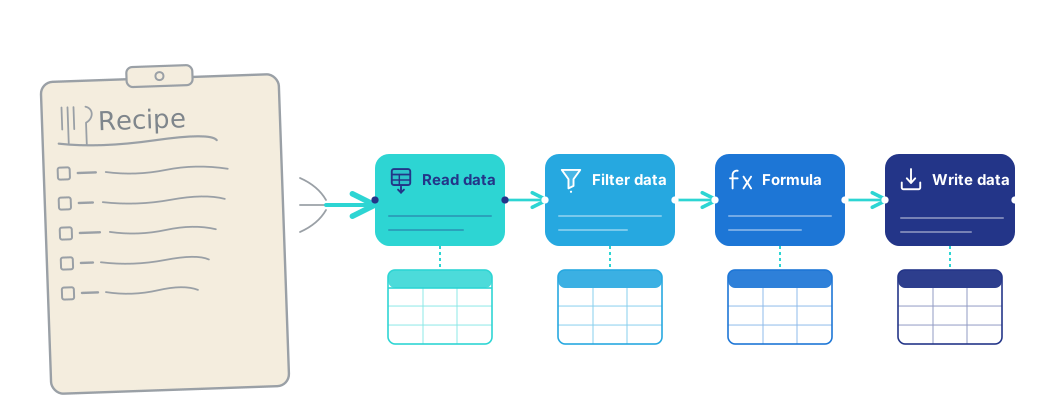
None of this requires programming. Each step is a form you fill in — pick a column, choose a condition, name the result — the way you'd set up a formula in a spreadsheet, not the way you'd write code.
Where it compounds: the catalog
Building a flow solves one week's problem. The catalog is what makes the weeks add up.
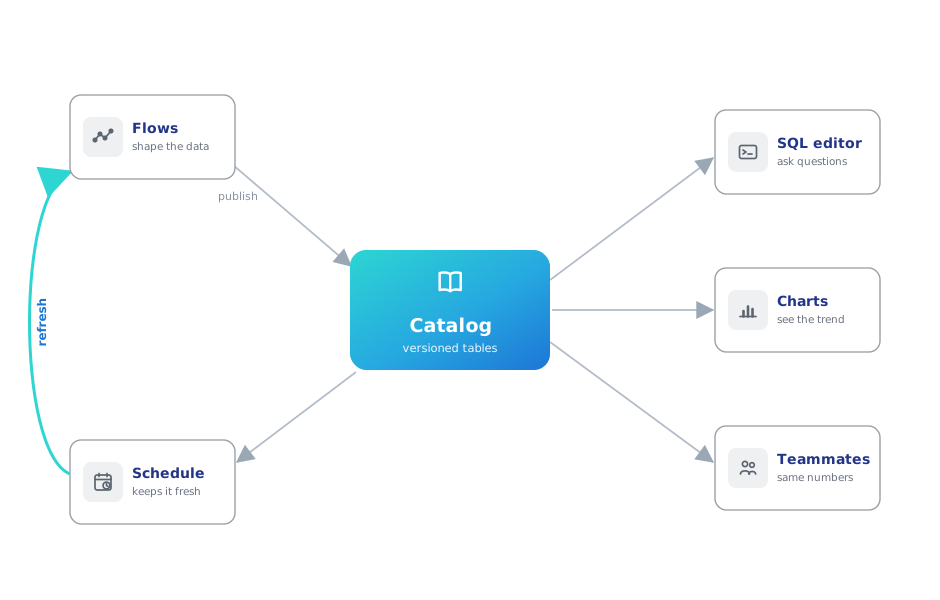
Instead of exporting results to files, a flow can publish its result into the catalog — Flowfile's built-in home for your data products. A table in the catalog is alive in ways a file never is:
- It keeps its history — you can see, and go back to, what it contained in March.
- It knows its origin — the flow that produced it is one click away, always.
- It can be queried and charted right there — SQL and interactive visualizations, no export.
- It can refresh itself — schedule the flow, and the table (and every chart on it) stays current with nobody pressing Run.
- It can be shared — teammates get access to the table itself, not a copy of it.
The shift: you stop producing files and start maintaining a small library of living results.
Never more complicated than your problem
You can use a tenth of Flowfile and never touch the rest:
- You see everything. Every step previews its data, so a mistake is visible at the step that made it.
- You start where you are. If you know Excel, the concepts transfer directly. If you've never touched a formula, the steps are forms with dropdowns.
- Nothing is in the way. The canvas doesn't ask about scheduling; the catalog doesn't ask about Python. Each part appears when you need it.
- One install.
pip install flowfile— or the desktop app, or a browser tab with nothing installed at all — brings the whole platform: canvas, catalog, everything.
It grows in whatever direction you do
The same platform keeps up as the work gets more ambitious — without ever demanding it:
- More data than a spreadsheet survives? Flowfile runs on Polars, a fast data engine, so large files stay workable where a spreadsheet would stall.
- Data living in company systems? Databases, cloud storage, Kafka streams, APIs — connect once, read live, stop hand-carrying copies.
- Colleagues who code? Every flow is equally real as Python: write pipelines in code that appear on the canvas, or take any visual flow and export it as a plain Python script that runs on its own. Nobody is locked in — in either direction.
- A team? Run it as a shared server with accounts, access control, and shared data products.
The through-line never changes: whatever you build, at whatever level, is reproducible by construction.
See it in ninety seconds
The Quickstart builds a real flow — deduplicate a sales file, filter it, total income per city, publish it to the catalog — and it's the same example you can open in your browser right now, no install, already assembled.
Then pick the route written for how you work.