Export to Python
The Code Generator exports a visually designed flow as executable Python. Use it to inspect the transformation logic behind a flow, integrate a Flowfile pipeline into an existing Python project, or extend a workflow with custom scripts.
For pure transformation flows (filter, join, group by, etc.), the generated code is Polars — usually just import polars as pl, and never an import flowfile. A few nodes add a small standalone helper package instead of native Polars: formula and advanced-filter expressions that can't be lowered to native Polars pull in polars_expr_transformer, fuzzy match pulls in pl_fuzzy_frame_match, and the graph solver pulls in polars_grouper — each a lightweight PyPI package, not Flowfile. Flows that include I/O nodes (database, catalog, cloud storage, Kafka) additionally use import flowfile as ff for connection-aware operations. The transformation logic is Polars in every case.
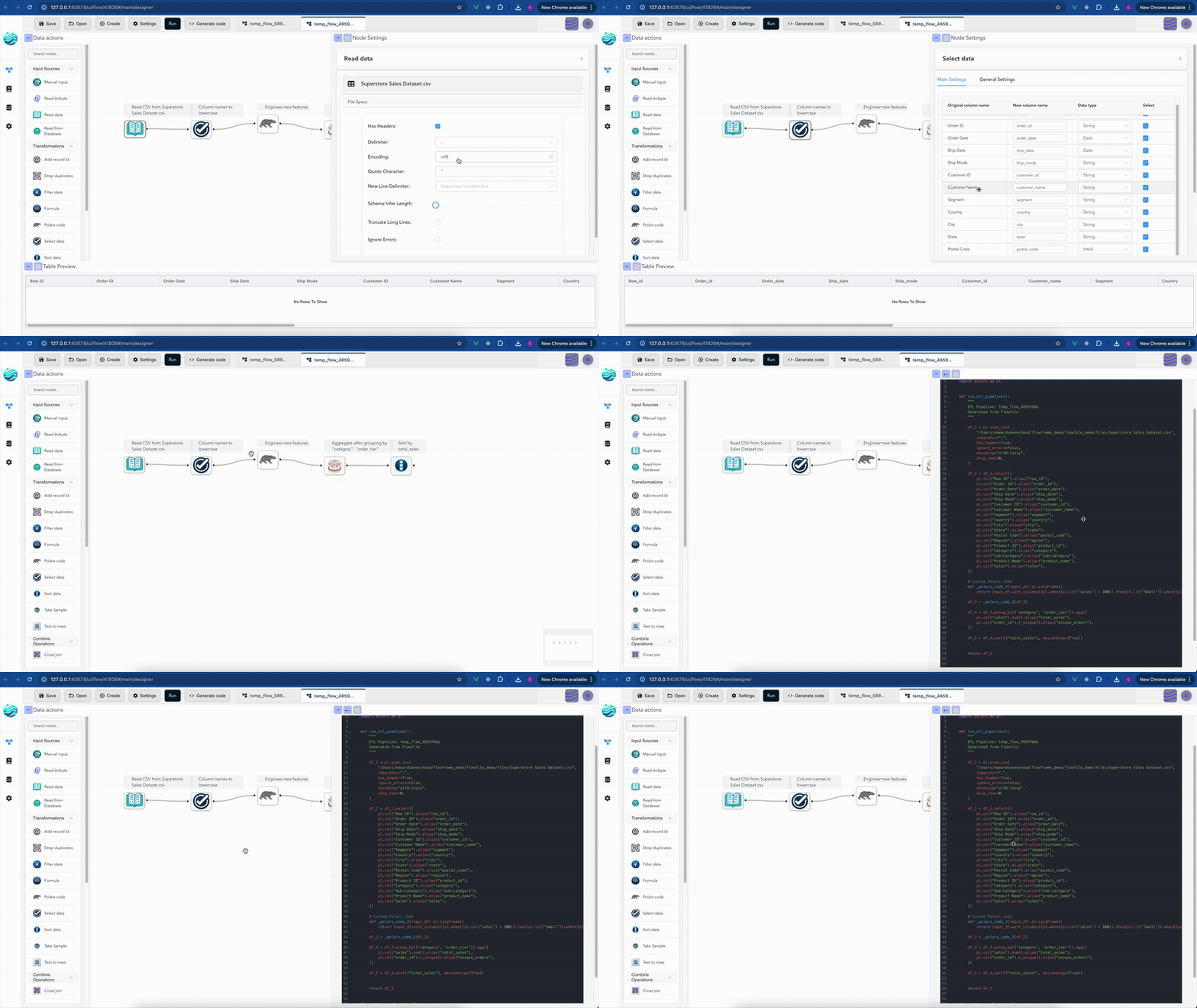
Key Characteristics of the Generated Code
- Transformation nodes translate to Polars operations; I/O nodes (database, catalog, cloud storage, Kafka) translate to FlowFrame API calls (
ff.read_database(),ff.read_catalog_table(), etc.). - The structure mirrors your visual flow. Pure transformation flows depend only on Polars (plus a small
polars_*helper package for formula, fuzzy-match, or graph-solver nodes); flows with I/O nodes requirepip install flowfile.
Examples of Generated Code
These simplified examples show what the generated Polars code looks like for common Flowfile operations, and how a visual flow maps to Python.
Example 1: Reading a CSV and Selecting Columns
This example shows how a pipeline that reads a CSV file and then selects/renames specific columns translates into Polars code.
Flowfile Pipeline:
- Read CSV (e.g.,
customers.csv) - Select (e.g., keep
nameascustomer_name,age)
Generated Polars Code
# Example 1: Reading a CSV and Selecting Columns
import polars as pl

def run_etl_pipeline():
    """
    ETL Pipeline: Example CSV Read and Select
    Generated from Flowfile
    """
    df_1 = pl.scan_csv("/path/to/your/customers.csv")
    df_2 = df_1.select(
        pl.col("name").alias("customer_name"),
        pl.col("age")
    )
    return df_2

if __name__ == "__main__":
    pipeline_output = run_etl_pipeline()
Example 2: Grouping and Aggregating Data
This example demonstrates the code generated for a pipeline that processes a dataset and performs a group by operation with aggregations.
Flowfile Pipeline:
- Manual Input (sample sales data with
productandrevenue) - Group By (e.g., group by
product, sumrevenueastotal_revenue)
Generated Polars Code
# Example 2: Grouping and Aggregating Data
import polars as pl

def run_etl_pipeline():
    """
    ETL Pipeline: Example Grouping and Aggregating
    Generated from Flowfile
    """
    # Simplified manual input example
    df_1 = pl.LazyFrame(
        {
            "product": ["A", "B", "A", "B", "C"],
            "revenue": [100.0, 200.0, 100.0, 200.0, 150.0],
        }
    )
    df_2 = df_1.group_by(["product"]).agg([
        pl.col("revenue").sum().alias("total_revenue"),
    ])
    return df_2

if __name__ == "__main__":
    pipeline_output = run_etl_pipeline()
Example 3: Custom Polars Code Execution
For advanced users, Flowfile offers a "Polars Code" node where you can write custom Polars expressions. Here's how that custom code is integrated into the generated script.
Flowfile Pipeline:
- Manual Input (a basic DataFrame)
- Polars Code (a node containing custom Polars logic, e.g., adding a new column)
Generated Polars Code
# Example 3: Custom Polars Code Execution
import polars as pl

def run_etl_pipeline():
    """
    ETL Pipeline: Custom Polars Code Example
    Generated from Flowfile
    """
    df_1 = pl.LazyFrame({"value": [1, 2, 3]})

    # Custom Polars code as defined in the Flowfile node.
    # The wrapper name is derived from the node id — e.g. _polars_code_2 for node 2.
    def _polars_code_2(input_df: pl.LazyFrame):
        return input_df.with_columns((pl.col('value') * 10).alias('scaled_value'))

    df_2 = _polars_code_2(df_1)
    return df_2

if __name__ == "__main__":
    pipeline_output = run_etl_pipeline()
Example 4: Reading from the Catalog
When a flow includes I/O nodes like a catalog reader, the generated code imports flowfile and uses the FlowFrame API for connection-aware operations.
Flowfile Pipeline:
- Catalog Reader (e.g.,
sales_datatable from namespace 3) - Filter (e.g., keep rows where
amount > 100)
Generated Code
# Example 4: Catalog Read with Filter
import flowfile as ff
import polars as pl

def run_etl_pipeline():
    """
    ETL Pipeline: Catalog Read and Filter
    Generated from Flowfile
    """
    df_1 = ff.read_catalog_table("sales_data", namespace_full_name="sales.raw").data
    df_2 = df_1.filter(pl.col("amount") > 100)
    return df_2

if __name__ == "__main__":
    pipeline_output = run_etl_pipeline()
.data accessor
The generated code calls .data on FlowFrame results to extract the underlying Polars LazyFrame. This keeps the rest of the pipeline as standard Polars operations.
Example 5: A Gated If/Else Branch
A Gate node exports as a real if block. Flow parameters become keyword arguments of the generated function, so the exported script takes the same switch the flow does. With the else output enabled the two branches are exactly complementary, so the generator emits a genuine if/else pair — and the Union that re-converges them collapses to a plain conditional assignment: whichever side ran is the result.
Flowfile Pipeline:
- Manual Input (
region,amount) - One Gate on the flow parameter
env(equals prod) with the else output enabled - A Formula behind each exit, tagging the rows with a
channel - Union Data merging both branches
Generated Polars Code
import polars as pl


def run_etl_pipeline(*, env: str = 'dev'):
    """
    ETL Pipeline: gated
    Generated from Flowfile
    """

    df_1 = pl.LazyFrame([['north', 'south'], [10, 5]], schema=pl.Schema([("region", pl.String), ("amount", pl.Int64)]), strict=False)

    if env == 'prod':
        df_4 = df_1.with_columns([(pl.lit("prod")).alias("channel").cast(pl.String)])
    else:
        df_5 = df_1.with_columns([(pl.lit("dev")).alias("channel").cast(pl.String)])

    if env == 'prod':
        df_6 = df_4
    else:
        df_6 = df_5

    return df_6


if __name__ == "__main__":
    pipeline_output = run_etl_pipeline()
The if/else fusion applies only when the two guards are one gate's exactly-complementary then/else pair. A Union behind guards that aren't provably exhaustive — say two independent gates — instead collects each surviving branch into a list under its own if guard and concatenates the list; when every input is guarded that way the generator also adds an if not <list>: fallback appending an empty schema-typed frame, because all branches could be closed at run time and the concat needs at least one frame. That fallback is a deliberate divergence from the visual editor: when every input is gated off, the engine skips the Union and everything downstream, while the exported script continues with the empty frame and produces zero-row output.
A gate that routes on a formula instead emits a boolean flag — the formula applied as a row predicate to the control input (or the data input) via a small helper the generator adds to the script; the if blocks then read the flag.
All export modes
The FlowFrame and Project exports emit the same if/else blocks and union assignment (and the same guarded list-appends where those still apply), with any no-branch-ran stand-in wrapped as an ff.FlowFrame, and a formula gate probes the frame's underlying LazyFrame via .data.
Project Export
For more complex flows — especially flows that contain notebook (Python script) nodes or custom user-defined nodes — a single generated script becomes hard to read. The third export mode, Project, exports the flow as a structured multi-file Python project instead:
my_flow/
├── pyproject.toml          # project metadata, pinned flowfile/polars dependencies
├── README.md               # flow description, node overview, how to run
├── main.py                 # entry point: python main.py
├── pipeline.py             # the FlowFrame pipeline (run_etl_pipeline())
├── flowfile_ctx.py         # local stand-in for the kernel flowfile_ctx API
├── notebooks/
│   └── node_05_clean_data.py   # one module per notebook node, code kept verbatim
└── custom_nodes/
    └── my_custom_node.py       # user-defined node classes, source kept verbatim
Key points:
- Notebook nodes are exported (they are not supported by the single-file modes). Each one becomes its own module exposing a
run()function that the pipeline calls with the node's input frames; the notebook code is preserved verbatim inside it (cell structure kept via# %%markers), and the bundledflowfile_ctx.pyshim makesread_input()/publish_output()/ artifacts / logging work standalone — inputs and outputs are exchanged in memory as Polars LazyFrames. - Custom nodes get their own modules under
custom_nodes/instead of being inlined into the script. - The pipeline itself uses the FlowFrame API (
import flowfile as ff). - Gates land in
pipeline.pyas realifblocks over the function's parameter arguments, exactly like the single-file exports. - Server-backed
flowfile_ctxAPIs (global artifacts, catalog access) raiseNotImplementedErrorin the exported project; the export panel and the generated README list these limitations per node.
From the Code panel you can either download the project as a .zip or save it directly into a folder using the built-in file browser.
Editing exported code
Exported code runs standalone; it does not round-trip back into the visual canvas. To keep editing a flow visually, work in the Designer and re-export.