SQL Editor
Query your catalog tables directly using SQL.
Not in Flowfile Lite
The SQL editor requires the full desktop/server build and is not available in the browser-only Flowfile Lite edition.
Opening the SQL Editor
Click the SQL button in the catalog toolbar to open the SQL editor panel.
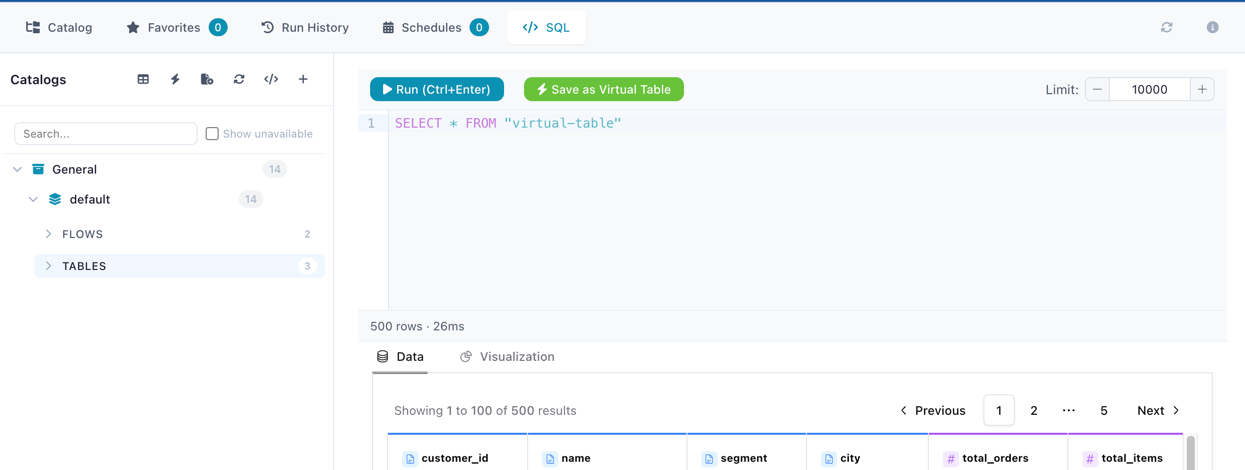
Writing Queries
All catalog tables — both physical and virtual — are automatically registered in the SQL context by their table name. You can query, join, filter, and aggregate across any combination of tables:
-- Simple query
SELECT * FROM customers WHERE region = 'Europe' LIMIT 100

-- Join across catalog tables
SELECT o.order_id, c.name, o.total
FROM orders o
JOIN customers c ON o.customer_id = c.id
WHERE o.total > 1000

-- Aggregate virtual and physical tables together
SELECT category, SUM(amount) as total
FROM sales_summary    -- virtual table
GROUP BY category
SQL dialect
The SQL editor uses the Polars SQL context, which supports standard SQL syntax including SELECT, WHERE, JOIN, GROUP BY, ORDER BY, HAVING, UNION, subqueries, and window functions.
Save as Virtual Table
Turn any SQL query into a reusable virtual table. Click the bolt icon button after writing a query and fill in:
- Table name — name for the new virtual table
- Catalog / Schema — target namespace in the catalog hierarchy
- Description (optional)
How It Works
When you save a query as a virtual table:
- The SQL is validated for safety (only read operations are allowed)
- The query is executed once with a single-row limit to derive the output schema (column names and types)
- The query text is stored in the catalog — no data is materialized to disk
Each time the virtual table is read (via Catalog Reader, another SQL query, or the Python API), the stored query is re-executed against the latest catalog data. This means:
- Results are always fresh — reflecting the current state of all referenced tables
- The virtual table can reference other catalog tables, including other virtual tables
- Recursive references are supported up to 5 levels deep, with circular reference detection
Query-based vs flow-based virtual tables
Query-based virtual tables (created here) store a SQL query. Flow-based virtual tables (created via a Catalog Writer node) store a reference to a producer flow. Both appear identically in the catalog and can be read the same way. See Virtual Tables for the full comparison.
Python API
SQL queries against catalog tables also run from Python. This tested example writes an aggregate to the catalog and queries it back (note read_catalog_sql is imported from flowfile_frame — it is not on the ff namespace):
import flowfile as ff
from flowfile_frame import read_catalog_sql

SALES = "https://raw.githubusercontent.com/edwardvaneechoud/flowfile/main/data/templates/supermarket_sales.csv"

income_by_city = (
    ff.read_csv(SALES)
    .group_by("city")
    .agg(ff.col("gross_income").sum().alias("total_income"))
)

ff.write_catalog_table(
    income_by_city, "docs_sales_by_city", schema=ff.default_schema(), write_mode="overwrite"
)

top_cities = read_catalog_sql(
    "SELECT city, total_income FROM docs_sales_by_city ORDER BY total_income DESC"
)
See Reading Data — Catalog SQL for full documentation.
Related Documentation
- Catalog Overview — Managing flows, tables, and namespaces
- Virtual Tables — Non-materialized tables queryable via SQL
- Reading Data (Python API) —
read_catalog_sql()reference