Connect to AWS S3 and S3-compatible storage
This guide walks you through creating an AWS S3 (or S3-compatible, such as MinIO) connection in Flowfile so you can read and write cloud data from your flows.
Not in Flowfile Lite
Cloud storage connections require the full desktop/server build. This guide does not apply to the browser-only Flowfile Lite edition, which has no backend.
Overview
A cloud storage connection stores your AWS credentials and configuration under a name, which you reference from reader and writer nodes across workflows.
Create an S3 connection
1. Open the dialog. In the left sidebar, open Settings → Connections → All connections, select the Cloud Storage tab and click "+ Add Connection".
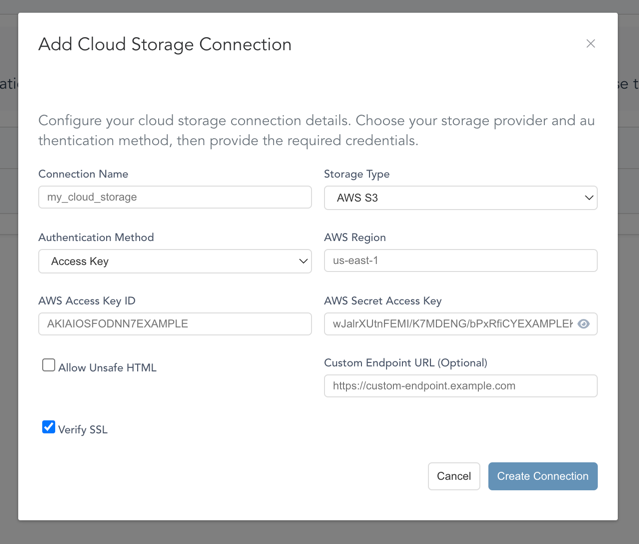
2. Configure the connection.
Basic Settings
| Field | Description |
|---|---|
| Connection Name | A unique identifier for this connection (e.g., my_s3_storage) |
| Storage Type | Select AWS S3 |
Authentication Methods
Choose one of the following authentication methods:
Access Key
- AWS Access Key ID: Your AWS access key (e.g.,
AKIAIOSFODNN7EXAMPLE) - AWS Secret Access Key: Your AWS secret access key
- AWS Session Token (Optional): Only for temporary credentials, such as keys issued by AWS STS. Stored encrypted; leave it blank when editing to keep the stored token. Entering a new key ID or secret without a token removes the stored one.
- AWS Region: The AWS region where your S3 buckets are located (e.g.,
us-east-1)
AWS CLI
- Uses credentials from the AWS configuration on the machine running Flowfile (
~/.aws/credentials,~/.aws/config, orAWS_*environment variables) - AWS Profile (Optional): The profile to read, for example
analytics. Leave it blank to use the default credential chain: environment variables, then thedefaultprofile, then an instance role. A profile name that does not exist fails with an error naming it. - AWS Region: The AWS region where your S3 buckets are located
The connection name is only a label; it is never used as the profile name.
Upgrading AWS CLI connections
Earlier versions used the connection name as the AWS profile. After upgrading, existing AWS CLI connections use the default credential chain until their AWS Profile field is set.
Advanced Settings (Optional)
These apply to every authentication method, AWS CLI included, so an AWS CLI connection can point at MinIO or another S3-compatible service.
| Field | Description |
|---|---|
| Custom Endpoint URL | For S3-compatible services (e.g., MinIO) |
| Allow HTTP (unencrypted) endpoint | Allows plain http:// endpoints, such as a local MinIO server. Leave it off for AWS. |
| Verify SSL | On by default. Turning it off skips TLS certificate checks for reads, writes and browsing; use it only for an endpoint with a self-signed certificate. The same checkbox applies to Azure Data Lake Storage connections and has no effect on Google Cloud Storage. |
3. Save. Click "Create Connection".
Using S3 Connections in Workflows
Once created, your S3 connection will appear in the Cloud Storage Reader and Writer node's connection dropdown.
- Add a Cloud Storage Reader node to your workflow
- Select your connection from the dropdown
- Click Browse to navigate the bucket and pick a file or folder, or type the S3 path
yourself (e.g.,
s3://my-bucket/data/file.csv) — always the full URI, includings3:// - Configure file format options
- Run your workflow
Picking a file sets the scan mode to Single File; picking a folder sets it to Directory. If the connection's credentials aren't allowed to list buckets, the browser asks for a bucket name instead — everything below it still browses normally.
The path must start with s3://, az://, abfss:// or gs://. The node's settings show a
warning while the path is empty or has no scheme, and a run fails before anything is read or
written, for example with Cloud storage writer has no target path. Enter an object-storage URI
such as s3://bucket/folder/table.
Running a node without a connection
The reader and writer nodes also offer No connection (this machine's AWS credentials); the label
names Azure or Google Cloud instead when the path starts with az://, abfss:// or gs://. It uses
the credentials of the machine running Flowfile, not a saved connection:
- For
s3://paths, the AWS default credential chain:AWS_*environment variables, thedefaultprofile in~/.aws, then an instance role. With no credentials at all, the run fails with No AWS credentials found in the local AWS profile or environment. - For
az://,abfss://andgs://paths, that provider's credentials from the environment.
No saved endpoint applies, so MinIO and other S3-compatible services need a connection, unless
AWS_ENDPOINT_URL is set in the environment of the machine running Flowfile.
Not available on a multi-user server
In a multi-user Docker deployment the option is disabled, and a flow that still has it fails with Select a cloud storage connection; server credentials are not available in multi-user mode. Local file paths are refused the same way, and only an administrator's connections may use the server's own identity (AWS CLI, IAM Role, Managed Identity or Application Default Credentials).
In Python
The same connection, created and used from code — this example is tested against a real S3-compatible service on every commit:
income_by_city = (
    ff.read_csv("data/templates/supermarket_sales.csv")
    .group_by("city")
    .agg(ff.col("gross_income").sum().alias("total_income"))
)

income_by_city.write_parquet_to_cloud_storage(s3_path, connection_name="analytics-s3")

reloaded = ff.scan_parquet_from_cloud_storage(s3_path, connection_name="analytics-s3").collect()
See Cloud Connections in Python for all fields and auth methods.