Settings
Configure Flowfile's appearance and behavior.
The Settings menu
The Settings gear icon in the left sidebar opens the Settings menu, grouped by purpose.
| Group | Items | Notes |
|---|---|---|
| Connections | All connections: Overview, Database, Cloud Storage, Kafka, Google Analytics, Secrets | Opens the Connections page on Overview; the other names are its in-page tabs. Secrets covers encrypted credential storage. |
| AI | Providers; Assistant | Providers holds the API keys per LLM provider and the optional on-device model; Assistant holds the default model and agent behaviour — see Provider Setup and AI Assistant. |
| Execution | Python Kernels; Performance | Python Kernels manages the containers described in Kernel Execution. Performance is admin-only in Docker. |
| Preferences | Privacy; Backups | Privacy holds the telemetry consent described in Privacy & Telemetry. Backups is admin-only in Docker — see Database backups. |
| Extensions | Node Designer, Custom Nodes, Community Nodes | Node Designer authors and publishes nodes; Community Nodes browses and installs shared ones. |
| Workspace | Project; File Manager, User Groups, User Management | Project is project tracking. File Manager, User Groups and User Management are Docker only; User Management is also admin-only. Sharing covers groups and grants. |
Theme
Open the Help & more menu (the ? button at the bottom of the sidebar) and click Dark mode / Light mode to switch between:
| Mode | Description |
|---|---|
| Light | White backgrounds |
| Dark | Reduced brightness for low-light |
Until you choose, Flowfile follows the operating-system theme. Your preference persists across sessions.
User Management
Available in Docker mode only.
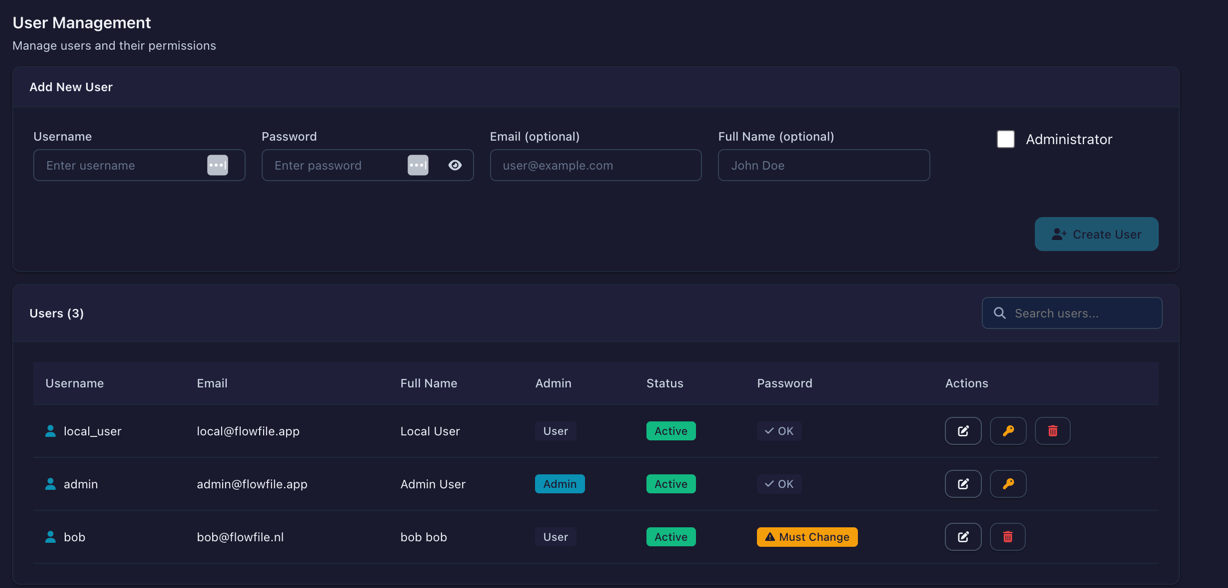
Manage team access from the User Management page. In the sidebar, click Settings (gear icon), then Workspace → User Management.
Creating Users
- Click Add User
- Enter username, email, full name
- Set temporary password
- Optionally grant admin privileges
- Click Create
New users must change their password on first login.
Password Requirements
- Minimum 8 characters
- At least one number
- At least one special character (
!@#$%^&*()_+-=[]{}|;:,.<>?)
Admin Privileges
Admins can:
- Create, modify, and delete users
- View all users in the system
- Grant/revoke admin status
Deleting Users
Deleting a user removes their:
- Account and login access
- Stored secrets
- Saved connections
Flow definitions are preserved.
Usage telemetry
Flowfile can send anonymous usage statistics, which the maintainers use to see how the platform is used and what to improve. It is off by default. A one-time dialog asks for consent, and you can change your answer under Settings → Preferences → Privacy. Privacy & Telemetry lists what is sent.
Related
- Secrets - Encrypted credential storage
- Docker - Docker deployment
- Privacy & Telemetry - What usage statistics are sent, and how to turn them off