Sharing resources with user groups
Group-based sharing lets a Flowfile Docker (multi-user) deployment share secrets, connections, and catalog resources across users. This page covers creating user groups, sharing a resource at the right access level, how Flowfile decides who can see what, and why shared secrets stay secure.
Docker mode only
Group-based sharing exists only in the multi-user Docker deployment. In the desktop app and the pip-installed package there is one user, so the feature is dormant — the /user-groups and /shares endpoints return 404 and the sharing UI does not appear.
The model
You don't share a resource with a person — you share it with a group, and people are members of groups. A share grants a group either use or manage access to one resource. A user can reach a resource if they own it, or if any group they belong to has been granted access to it. Sharing is authorization only: it changes who is allowed to use a resource, never the resource's stored data or its encryption.
The catalog is private by default
In Docker mode every user sees only what they own, what has been shared with a group they belong to, and the seeded public system namespaces (General, default, Unnamed Flows, Local Flows) as tree containers. Global admins still see everything.
If your team expects "everyone sees every flow and table," that visibility is not automatic — you have to create a group, add the members, and share the namespaces, tables, and flows you want everyone to see. No data is lost; only its visibility narrows.
User groups
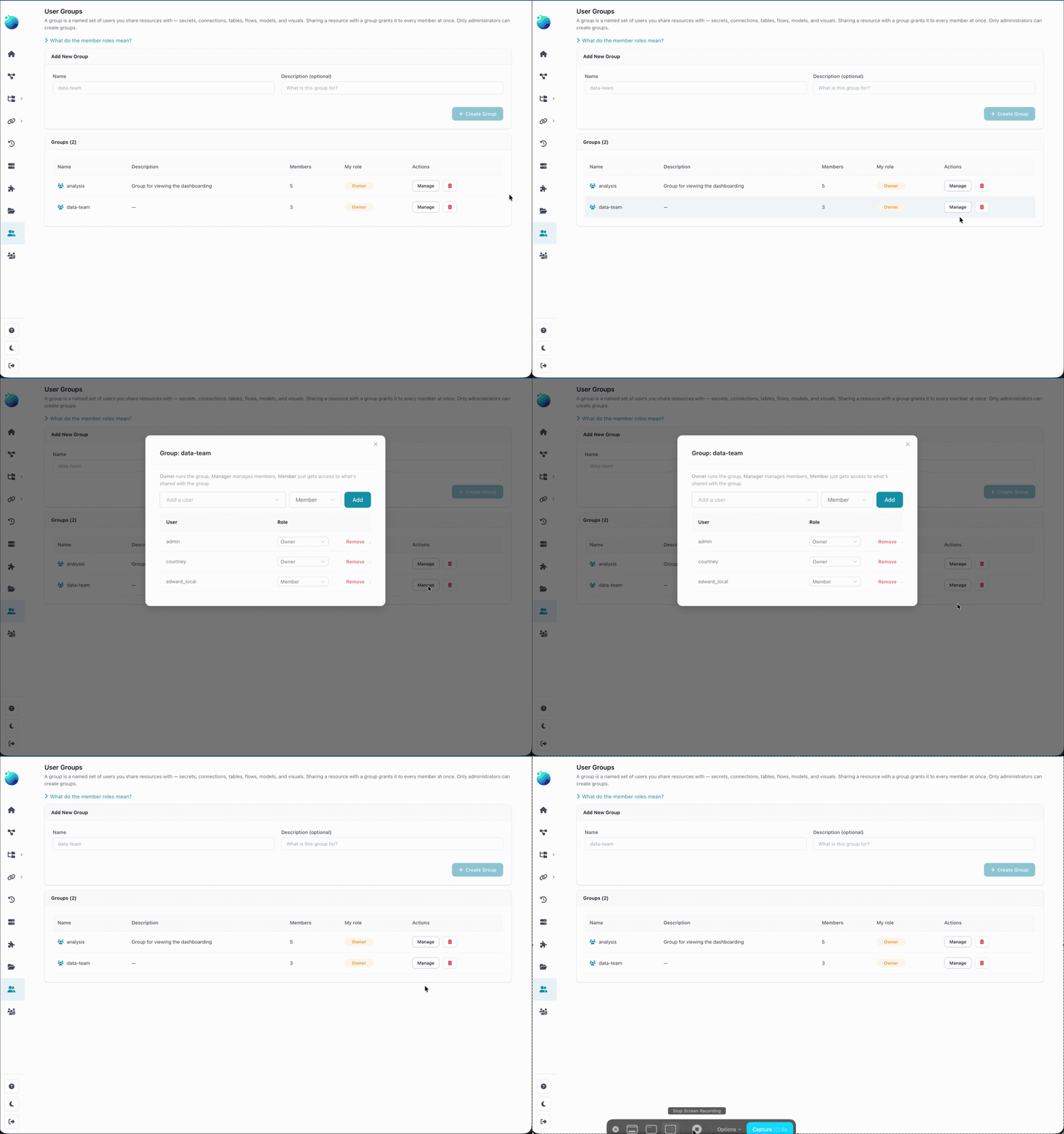
Groups are the principals you share with. A group has members, and each member has a role:
| Role | Can do |
|---|---|
| owner | Manage membership and roles; administer the group. |
| manager | Manage membership and roles. |
| member | Belong to the group and reach whatever is shared with it. |
Only a global admin creates a group; the creator is automatically added as its owner. From then on the group's owners and managers run membership themselves — a group owner does not need to be a global admin to add or remove members. Every group keeps at least one owner.
Create and manage groups from Settings → Workspace → User Groups.
Sharing a resource
A resource's owner (or a global admin) shares it with a group by choosing an access level:
- Use — read and execute. A group member can run a flow, use a connection in a flow, or read a table, but cannot edit or re-share it.
- Manage — everything use allows, plus edit and re-share.
Share resources with the Share action on the resource in the app.
What you can share
Sharing covers secrets, the four connection types (database, cloud storage, Google Analytics, Kafka), and catalog content — namespaces, tables, flows, notebooks, visualizations, dashboards, and models.
Sharing a namespace cascades: a grant on a namespace reaches the tables, flows, notebooks, visualizations, dashboards, and models inside it (and its direct child schemas).
Secrets are use-only
A secret can be shared for use but never for manage. A manage grant on a credential would imply the right to edit and re-share it, which collapses into handing over the plaintext. So a group's flows can run with a shared secret, but members can never view its value. Sharing a secret for use is therefore security-equivalent to giving the group that credential to run with.
Connections and the credential re-entry rule
A shared connection is usable directly in a group member's flows. Because a connection bundles a target (host / endpoint / protocol) with the owner's credential, there is one guardrail: a manage-grantee who changes the connection's target must re-enter the credentials. Otherwise a grantee could repoint a shared connection at a server they control and harvest the owner's credential by capturing what it sends. When a manage-grantee rotates the credential, the new value is re-encrypted under the owner's key — the stored value never changes hands.
A cloud connection that authenticates as the server itself (AWS CLI, IAM Role, Managed Identity, Application Default Credentials) works only while an administrator owns it; group members can run with it, but only an administrator can edit it. See Cloud storage access.
How access is resolved
When you ask for a resource by name (a secret in a flow, a connection, a catalog table), Flowfile resolves it own-first, then group-granted:
- If you own a resource with that name, you get yours.
- Otherwise, if a group you belong to has been granted access to a resource with that name, you get that one (lowest id wins on a name collision).
Your own resources always shadow shared ones with the same name, so a shared resource can never silently override something you own. Global admins bypass these checks and can reach everything.
Shared secrets stay encrypted
Granting a group access to a secret or connection never copies, re-encrypts, or exposes the credential.
Every secret is stored as $ffsec$1$<owner_id>$<ciphertext>, encrypted with a per-user key derived from the master key using the owner's user id. Because the owner's id is embedded in the stored value, decryption never depends on who runs the flow: when a group member's flow resolves a shared secret, Flowfile reads the owner id out of the value and re-derives the owner's key to decrypt it. The member's identity matters only for the authorization check — may this user resolve this secret by name.
Consequences:
- The plaintext is never returned to non-owners through the API; it only decrypts inside flow execution.
- Revoking a grant takes effect immediately. The grantee never held key material, so there is nothing to rotate or re-encrypt.
- The worker derives keys the same way and independently, so a shared secret decrypts unchanged wherever the flow runs.
Scheduling a shared flow
A use-level member can schedule a shared flow. The scheduled run executes as that member, so the flow's secret and connection references resolve against the member's own grants. Before scheduling a shared flow, make sure the member also has access to everything the flow uses (its secrets, connections, and tables) — otherwise the run fails to resolve them.
Not covered by sharing
Two things stay outside the sharing model:
- AI BYOK keys — each user's provider keys are personal.
- Uploaded files — in Docker mode the uploads directory is already common to all users.
Related
- Docker deployment — running Flowfile in multi-user mode.
- Connections & secrets — creating the resources you share.
- Schedules — automating shared flows.