Run Flowfile for a team
Running Flowfile for more than one person means operating a service: authentication, secrets, access control, backups, and upgrades. This page is the operator's route through all of it.
Multi-user Flowfile is three services and two kinds of state. A core API, a compute worker, and a frontend run as containers; everything worth backing up lives in two places — internal storage (catalog database, table data, logs) and user data (flows, uploads, outputs). Every operational question below reduces to one of those five pieces.
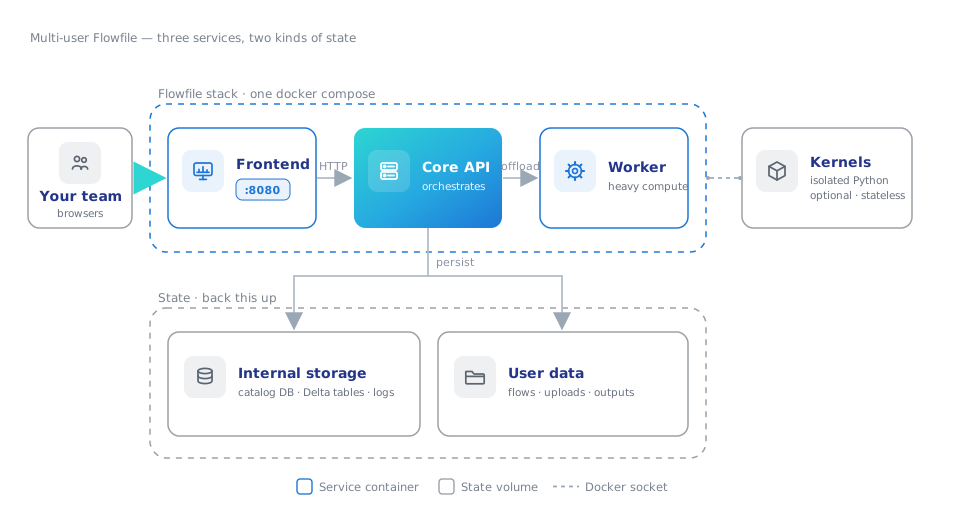
1. Pick the shape
Solo users don't need any of this — the desktop app or the pip install runs everything locally with nothing to operate. The Docker deployment is the team shape: real authentication (JWT), per-user encrypted secrets, a shared catalog with access control, and group-based sharing. The deployment overview compares all four editions if you're still choosing.
2. First boot, secured
A stack comes up in three commands:
git clone https://github.com/edwardvaneechoud/Flowfile.git
cd Flowfile
docker compose up -d          # frontend on :8080
The first-run wizard walks you through the master key. That key encrypts every credential your users store — database passwords, cloud keys, API tokens. Lose it and those secrets are cryptographically gone; there is no recovery path. Generate it, put it in .env, and back it up:
python -c "from cryptography.fernet import Fernet; print(Fernet.generate_key().decode())"
The shipped compose also boots with development fallbacks for JWT_SECRET_KEY and FLOWFILE_INTERNAL_TOKEN so a first up succeeds without configuration. Replace both before the stack is reachable by anyone else; the production checklist lists every value.
For a server deployment, the flowfile-hosting kit runs the published images version-pinned behind HTTPS (Caddy, Cloudflare Tunnel, or LAN), and its installer generates the secrets above instead of leaving fallbacks in place — plus make update / backup / restore / health for day two.
3. Understand who sees what
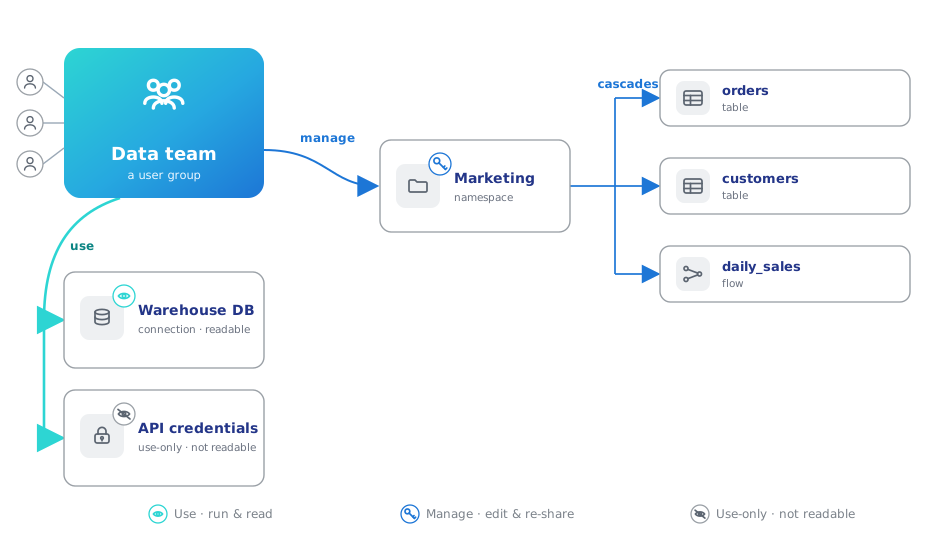
Multi-user Flowfile is private by default: users see what they own plus what's been shared with a group they belong to. Sharing is explicit and layered:
- A global admin creates user groups; group owners manage their own membership from there.
- Resource owners grant a group use (run it, read it) or manage (edit and re-share) per resource.
- A grant on a catalog namespace cascades to everything inside it — the practical way to open a team area.
- Shared secrets are use-only: flows run with them, nobody reads them. A manage-grantee who repoints a shared connection at a new host must re-enter its credentials.
"Everyone sees everything" is something you create explicitly: one group, everyone in it, a few namespace grants.
4. Know where the data lives
Back up two things and you can rebuild anything: the flowfile-internal-storage volume (catalog database, Delta table data, logs) and the user-data volume (flows, uploads, outputs). The Docker reference maps every volume and environment variable; catalog table data can optionally land in S3 instead of the local volume when the host shouldn't hold data.
5. Day two
- Scheduling — the shipped compose enables the scheduler, so users' schedules fire without any action from you.
- Scripted operations — everything the UI does headlessly goes through the CLI: flows in cron or CI, demo catalog seeding for onboarding sessions.
- Python-script nodes — kernels run user Python in isolated Docker containers. Core needs the Docker socket for this; kernel images are versioned separately from the app, and no kernels means the rest of the product still works.
- Workspace as code — Projects mirror flows, connections (credential-free), and catalog metadata into a git folder. In Docker mode it's admin-only and enabled with
FLOWFILE_ENABLE_PROJECTS. A project folder plus the master key rebuilds a workspace, so it doubles as a disaster-recovery layer.
6. Keep it current
Application images track the project version; kernel images version independently and only refresh when their tag changes. Upgrading pulls the new images and restarts:
docker compose pull && docker compose up -d
Flows and data live in the volumes, so upgrades don't touch them. Tags and kernel-image specifics live in the Docker reference.
Start here: clone the repo, docker compose up -d, open http://localhost:8080, and let the wizard walk you through the master key.