Kafka
Consume records from a Kafka or Redpanda topic, either as a node on the canvas or with ff.read_kafka in Python. This page covers the saved Kafka connection, the Kafka Source node's settings, the security options, and a runnable example.
Kafka support is read-only: Flowfile consumes from topics but does not produce to them. There is no Kafka writer node.
Not in Flowfile Lite
Kafka connections require the full desktop or server build. The browser-only Flowfile Lite edition has no backend and cannot connect to a broker.
Saved Kafka connections
A Kafka connection stores the broker address and (optionally) authentication, so nodes and scripts reference it by name instead of repeating credentials. Create one on the Connections page under the Kafka tab, or manage them alongside the other connection types described in Connections.
The connection form carries these fields:
| Field | What it is |
|---|---|
| Connection name | The name you reference later (in the node or ff.read_kafka). |
| Bootstrap servers | Comma-separated host:port list for the broker(s), e.g. localhost:19092. |
| Security protocol | One of PLAINTEXT, SSL, SASL_PLAINTEXT, SASL_SSL. |
| SASL mechanism | The SASL mechanism (e.g. PLAIN, SCRAM-SHA-256) when a SASL protocol is selected. |
| SASL username / password | Credentials for SASL authentication. The password is stored encrypted. |
| SSL CA location | Path to the CA certificate for verifying the broker (SSL/SASL_SSL). |
| SSL certificate location | Path to the client certificate for mutual TLS. |
| SSL key (PEM) | The client private key. Stored encrypted. |
| Schema registry URL | Optional schema-registry endpoint. |
| Extra config | Optional passthrough of additional confluent-kafka settings. |
The sasl_password and ssl_key_pem values are stored as encrypted secrets (Secrets) and never written into flow files. Reserved keys (bootstrap.servers, group.id, enable.auto.commit, and any sasl.* / ssl.* / security.protocol) are filtered out of Extra config so they can't override the managed settings.
Message format
The consumer parses each message value as JSON. value_format accepts json; other formats are not supported.
The Kafka Source node
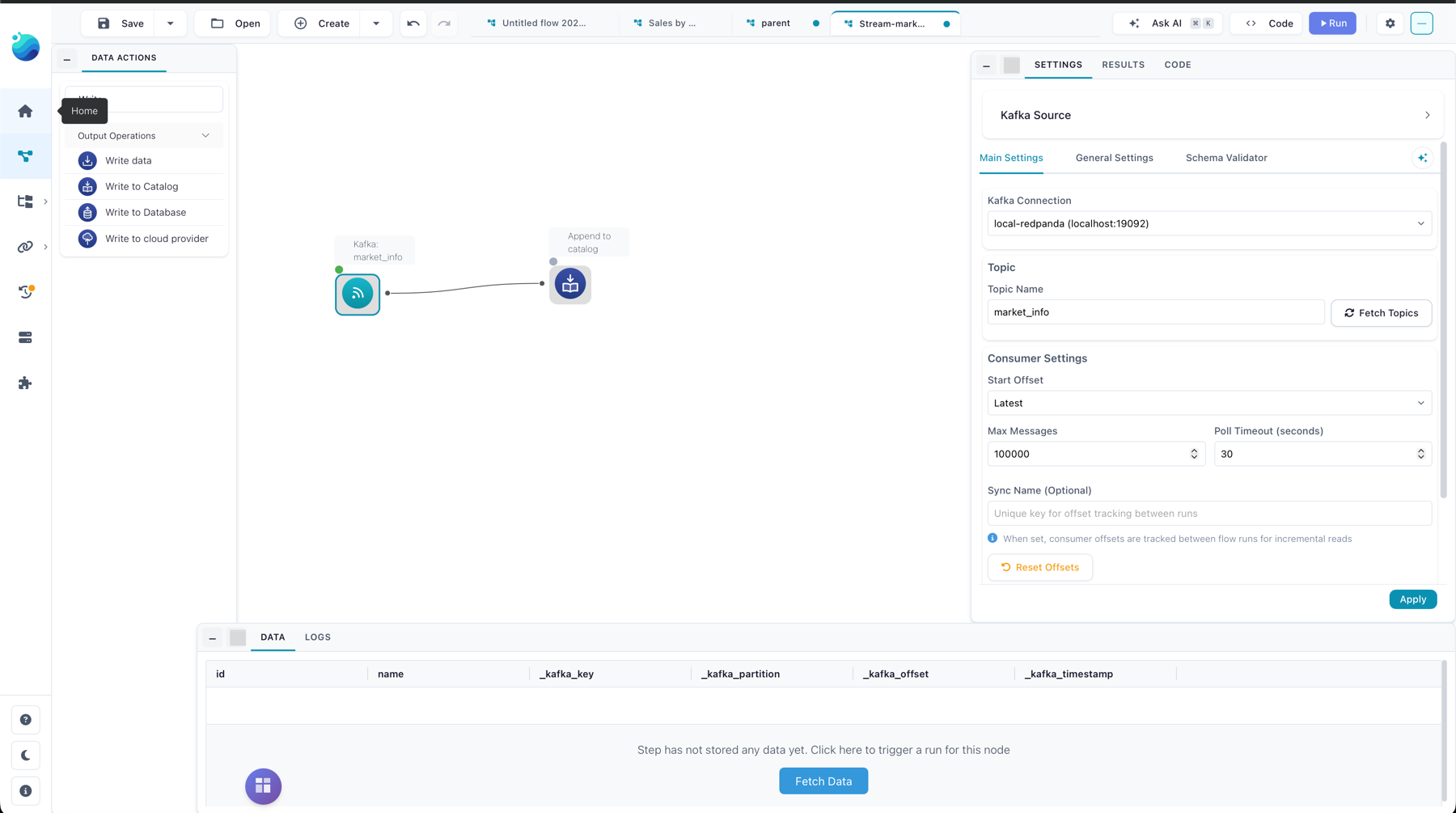
Add a Kafka Source node to the canvas, pick a saved connection, then choose a topic. The node offers these settings:
| Setting | Meaning |
|---|---|
| Topic name | The topic to consume from. When the connection can reach the broker, the node lists available topics; otherwise type the name. |
| Start offset | Latest (only new messages) or Earliest (from the beginning) — used the first time a consumer group reads. |
| Max messages | Cap on messages consumed in one run (default 100000). |
| Poll timeout (seconds) | How long to wait for messages before returning (default 30). |
| Sync name | The consumer-group id. Two runs with the same sync name resume where the last one left off. |
The node adds Kafka metadata columns to every row: _kafka_key, _kafka_partition, _kafka_offset, and _kafka_timestamp, alongside the parsed message fields.
Offsets are committed broker-side by consumer group after the run's downstream nodes succeed — a failed run does not advance the offset, so the next run re-reads the same messages. Use Reset Offsets in the node to rewind a consumer group to the beginning of a topic and re-read everything.
Read Kafka in Python
ff.read_kafka resolves a saved connection by name and returns a FlowFrame:
import flowfile as ff

orders = ff.read_kafka(
    connection_name,
    topic_name=topic,
    start_offset="earliest",
    poll_timeout_seconds=10.0,
).collect()
The signature is:
ff.read_kafka(
    connection_name,
    *,
    topic_name,
    max_messages=100_000,
    start_offset="latest",
    poll_timeout_seconds=30.0,
    value_format="json",
    description=None,
)
Kafka connections are created server-side (through the Connections page or the core API); there is no ff.* helper to create one. connection_name must match a connection that already exists for your user. Calling .collect() runs the consume in-process against the broker.
Kafka to catalog sync
Beyond one-off reads, Flowfile can generate a Kafka sync flow that consumes a topic and appends it to a catalog table as a kafka_source → catalog_writer pipeline. Run that flow on a schedule and each run picks up only the messages that arrived since the last, keeping the table current.