Notebooks
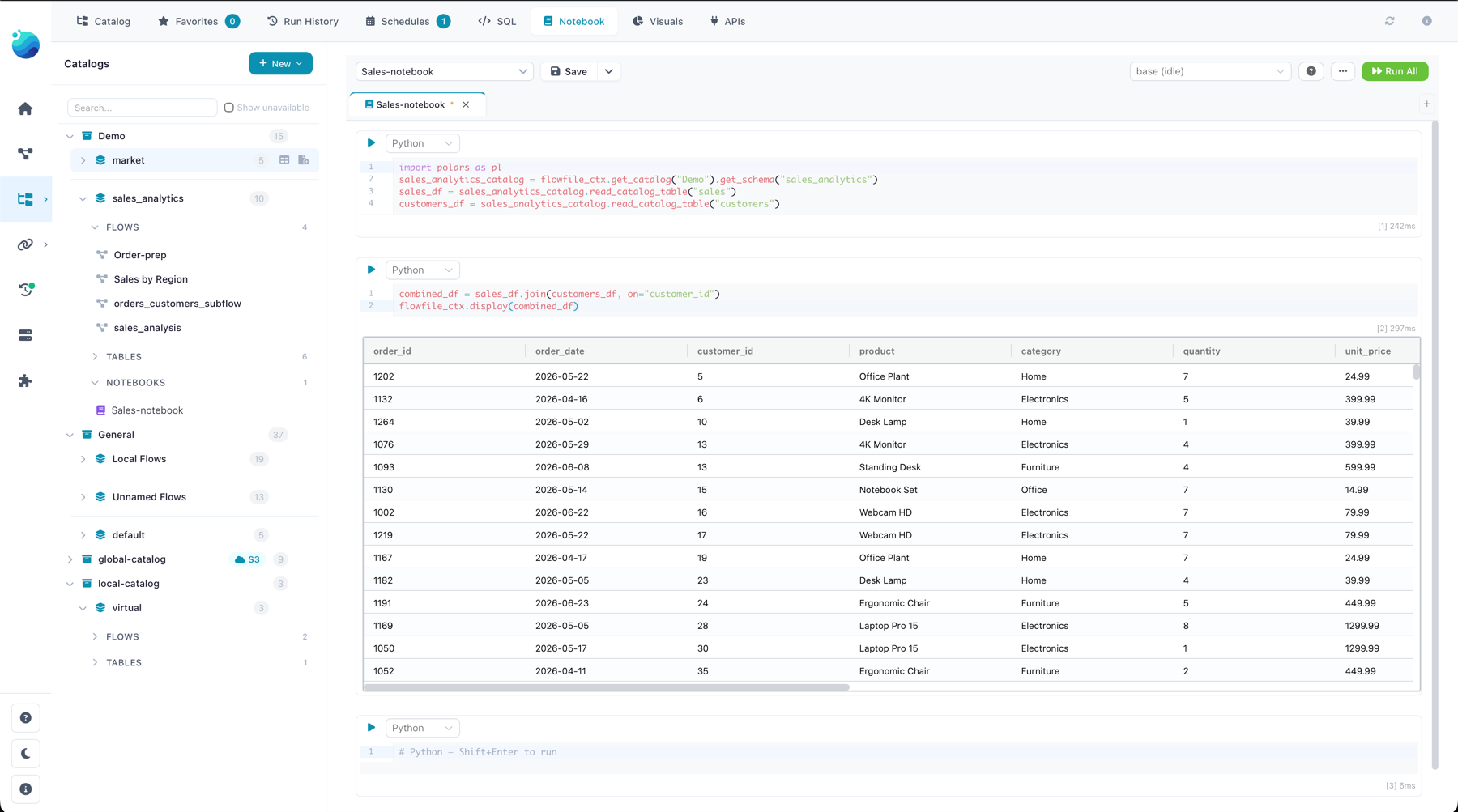
Notebooks are the catalog's exploration console: Jupyter-style cells that live next to your tables, in the catalog rather than in one person's private folder. Open one from the catalog tree, point it at a kernel, and analyze catalog data with any Python library — with the environment pinned by the kernel, so the notebook runs the same for everyone who opens it.
Creating and organizing
Notebooks are catalog residents: create one from the notebook panel (New notebook) and it takes a place in a namespace like any table or flow — same tree, same organization, and in Docker mode the same group-based sharing (a grant on the namespace reaches the notebooks inside it).
Cells
Two cell types, mixable freely:
- Python — executes on a kernel, which you pick in the toolbar. Any library the kernel image carries (or that you added to the kernel) is available. The notebook remembers your last-used kernel.
- Markdown — renders in place, no kernel needed. Use it for the narrative between the code.
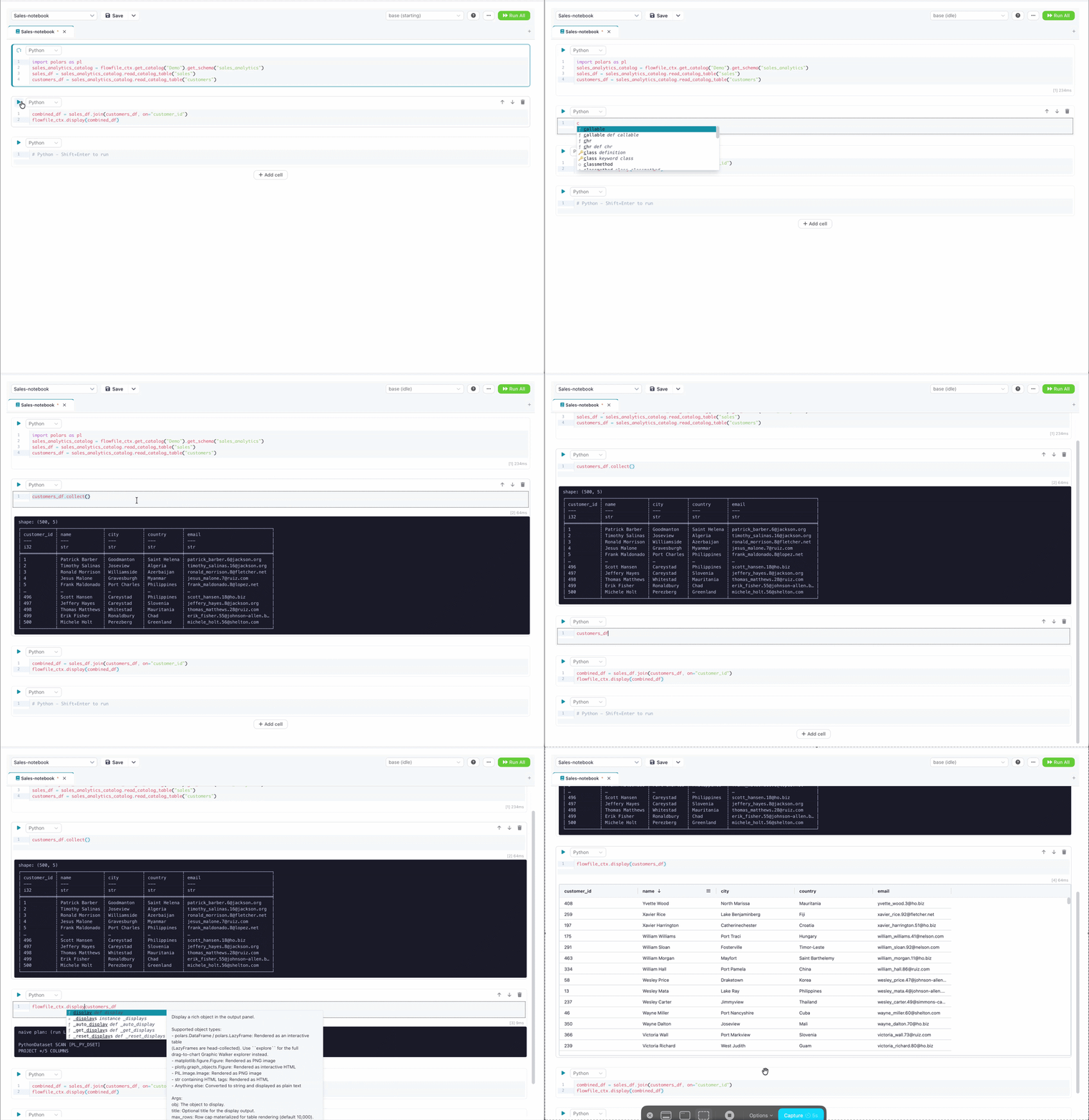
Keybindings match Jupyter: Shift+Enter runs a cell (or renders a Markdown cell) and moves to the next — adding a blank cell after the last one, so you can keep going without reaching for the mouse. Cmd/Ctrl+Enter runs it in place and leaves the caret where it is. The cell you are working in carries a highlighted border. In cell mode the last expression displays automatically, Jupyter-style, and the editor gives you code completions as you type. Open a quote where a column name belongs — orders.select(", pl.col(", orders[" — and the popup lists that frame's columns with their dtype and where the names came from: a catalog table's columns are known before you run anything, and after a run the kernel's own columns appear, labelled last run. When the editor cannot work out which frame you mean, it offers nothing rather than guessing.
Organizing cells
Reorder cells by dragging the six-dot handle at the left of a cell's toolbar: an insertion line shows where the cell will land, and Escape cancels the drag. With the handle focused, Alt+↑ and Alt+↓ move the cell one position and announce the result for screen readers ("Cell 3 moved to position 2 of 7"). The toolbar's Undo and Redo buttons revert and replay cell inserts, deletes and moves — the last 50 of them, per open notebook, discarded when you close the notebook tab; Cmd/Ctrl+Z inside a cell still undoes code edits. Reordering, inserting and deleting are disabled while the notebook is running, and the last remaining cell cannot be deleted.
The ⋯ menu on a cell's toolbar holds the rest: Insert above and Insert below place a new cell either side of this one and put the cursor in it, and Duplicate drops a copy immediately below — the code comes along, the old result does not, so you can fork a cell and change one thing without losing the original. Collapse code and Collapse output fold either half of a cell out of the way, which is what keeps a long notebook readable once the exploratory cells at the top have served their purpose. Collapsing hides nothing permanently: the code, its cursor and its text undo history are all still there when you expand it again, and the collapse itself is a view preference for this session only — it is never written to the notebook file, so a teammate opening it sees every cell expanded.
Outdated outputs
A result never disappears because you changed the code that made it — it stays on screen and says that it is out of date. Edit a cell that has already run and its output is labelled Code changed — rerun; every later Python cell that holds a result picks up Earlier cells changed — rerun, because running an earlier cell — or inserting, deleting, moving or duplicating one — can change the values everything below it was built on. A result from a kernel session that no longer exists is labelled Previous session, which is what you see after switching kernels or reopening the panel. Rerunning a cell clears its own label and leaves the ones below it alone.
Reset session in the ⋯ menu clears this notebook's variables on the kernel without stopping it: the kernel keeps running and other notebooks keep their own variables. The outputs and the execution counter are cleared with the variables, and a reset that fails says so rather than pretending to have worked. A response that arrives after a reset or a kernel switch is discarded instead of being written into the cell, so a slow run can never make an outdated output look current.
Exporting a notebook
The toolbar's ⋯ menu also saves a notebook as a file: Export as Python script… writes a .py with a # %% marker ahead of every cell (Markdown cells become comments), Export as Jupyter notebook… writes an .ipynb with each cell's last output, and Copy as Python script puts the script on the clipboard. The export reflects the cells as they are in the panel, saved or not, and is named after the notebook.
Talking to the catalog
Cells see the catalog through the same flowfile_ctx API that Python Script nodes use. display and explore are bound as bare names, so they need no prefix:
lf = flowfile_ctx.read_catalog_table("sales_by_city")   # by name; schema= / namespace_id= to disambiguate
display(lf)                                              # interactive table
explore(lf)                                              # Graphic Walker explorer
Reads come back as LazyFrames; flowfile_ctx.write_catalog_table persists a result as a real catalog table, and flowfile_ctx.publish_global saves a Python object (a trained model, a config) as a global artifact that survives across sessions and flows. The full cell-side API — inputs, outputs, display, artifacts — is documented in The flowfile_ctx API.
See it: a catalog notebook cell in action
Versioned like flows
A notebook's cells are stored as one clean YAML file on disk — code as readable text, not an opaque blob — which is what lets Projects version notebooks in git exactly like flows: diffs read like code review, and a teammate pulling the project gets your notebooks along with everything else.
Related
- Kernels — creating kernels, adding packages, the full
flowfile_ctxAPI. - SQL Editor — for pure-SQL exploration without a kernel.
- Catalog Architecture — how notebooks are stored and routed, for contributors.