Docker Reference
Run Flowfile as a multi-user stack with Docker. This is the deployment for teams and servers: authentication, encrypted secrets, a shared catalog, and (optionally) Docker-spawned kernels for Python-script nodes. This page covers quick start, configuration, security, kernels, and operations.
Two Docker paths exist, for different jobs:
- Evaluating or developing — this repo's bundled
docker-compose.yml, which builds the images from source on firstup. That's what the quick start below uses. - Deploying on a real server — the flowfile-hosting kit, a separate repository that runs the published Docker Hub images pinned to a version (
image: edwardvaneechoud/flowfile-core:${FLOWFILE_VERSION}) and handles what this repo's compose does not: HTTPS ingress (Caddy with Let's Encrypt, a Cloudflare Tunnel for no-open-ports setups, or plain LAN), a guided installer (./install.sh, ormake init) that generates secrets and verifies DNS, and day-two targets forupdate,backup,restore, andhealth. If the instance will have users other than you, start there.
Quick Start
git clone https://github.com/edwardvaneechoud/Flowfile.git
cd Flowfile
docker compose up -d
Access at http://localhost:8080. On first run the setup wizard guides you through master-key configuration.
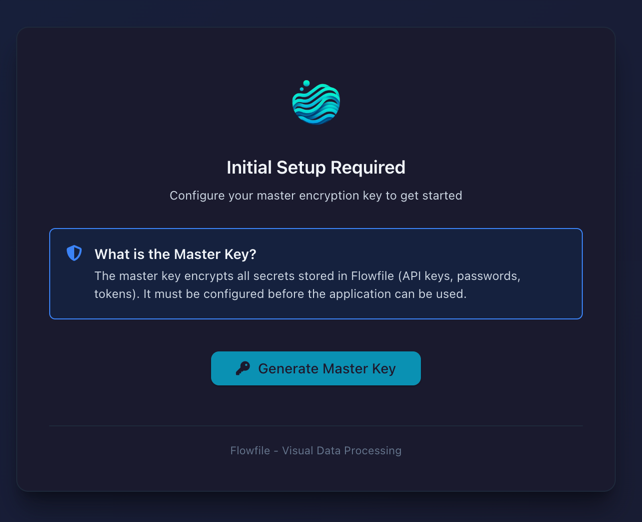
First-run master key
The bundled compose leaves FLOWFILE_MASTER_KEY empty, so the setup screen prompts you to configure it:
- Open
http://localhost:8080. - Click Generate Master Key and copy the key.
- Add it to your
.env:FLOWFILE_MASTER_KEY=<your-key>. - Restart:
docker compose restart. - Log in with the admin credentials (default
admin/changeme;FLOWFILE_ADMIN_USERandFLOWFILE_ADMIN_PASSWORDset them).
For an automated deployment, generate the key ahead of time and set it before the first boot:
python -c "from cryptography.fernet import Fernet; print(Fernet.generate_key().decode())"
Losing the master key loses your secrets
The master key encrypts every stored secret. If you change or lose it, existing encrypted secrets become unreadable. Back up .env securely and never commit it to version control.
Docker Images
| Image | Description |
|---|---|
edwardvaneechoud/flowfile-frontend |
Web UI |
edwardvaneechoud/flowfile-core |
API server |
edwardvaneechoud/flowfile-worker |
Compute worker (heavy work runs in spawned subprocesses) |
edwardvaneechoud/flowfile-kernel-base |
Python-script kernel (base) |
edwardvaneechoud/flowfile-kernel-ml |
Python-script kernel with sklearn / xgboost / lightgbm / statsmodels |
edwardvaneechoud/flowfile-kernel-lite |
Slimmed Python-script kernel for constrained hosts |
The application images (flowfile-frontend, flowfile-core, flowfile-worker) share the project version and are published once per release: each v* tag pushes :<version>, and stable releases also move :latest (prerelease tags with a - suffix, e.g. -rc.1, don't). The kernel images carry their own version so the kernel runtime can evolve independently of the rest of the application; they are published only when that version is new, and the tag core pulls by default is set in flowfile_core/flowfile_core/kernel/images.py (_KERNEL_IMAGE_*_DEFAULT).
docker-compose.yml
The compose file bundled at the repo root is the source of truth. A trimmed version showing the load-bearing settings:
services:
  flowfile-frontend:
    image: edwardvaneechoud/flowfile-frontend:latest
    ports:
      - "8080:8080"
    networks:
      - flowfile-network
    depends_on:
      - flowfile-core
      - flowfile-worker

  flowfile-core:
    image: edwardvaneechoud/flowfile-core:latest
    ports:
      - "63578:63578"
    shm_size: '2gb'
    environment:
      - FLOWFILE_MODE=docker
      - FLOWFILE_ADMIN_USER=${FLOWFILE_ADMIN_USER:-admin}
      - FLOWFILE_ADMIN_PASSWORD=${FLOWFILE_ADMIN_PASSWORD:-changeme}
      - JWT_SECRET_KEY=${JWT_SECRET_KEY:-flowfile-dev-secret-change-in-production}
      # Shared secret for kernel → core authentication (must match the kernels)
      - FLOWFILE_INTERNAL_TOKEN=${FLOWFILE_INTERNAL_TOKEN:-flowfile-dev-internal-token-change-in-production}
      - FLOWFILE_MASTER_KEY=${FLOWFILE_MASTER_KEY:-}
      - FLOWFILE_SCHEDULER_ENABLED=true
      - FLOWFILE_ENABLE_PROJECTS=${FLOWFILE_ENABLE_PROJECTS:-true}
      - WORKER_HOST=flowfile-worker
      - FLOWFILE_STORAGE_DIR=/app/internal_storage
      - FLOWFILE_USER_DATA_DIR=/app/user_data
    volumes:
      # Docker socket lets core create kernel containers on the host.
      - /var/run/docker.sock:/var/run/docker.sock
      - ./flowfile_data:/app/user_data
      - flowfile-internal-storage:/app/internal_storage
      - ./saved_flows:/app/flowfile_core/saved_flows
    networks:
      - flowfile-network

  flowfile-worker:
    image: edwardvaneechoud/flowfile-worker:latest
    ports:
      - "63579:63579"
    shm_size: '2gb'
    environment:
      - FLOWFILE_MODE=docker
      - CORE_HOST=flowfile-core
      - FLOWFILE_MASTER_KEY=${FLOWFILE_MASTER_KEY:-}
      - FLOWFILE_STORAGE_DIR=/app/internal_storage
      - FLOWFILE_USER_DATA_DIR=/app/user_data
    volumes:
      - ./flowfile_data:/app/user_data
      - flowfile-internal-storage:/app/internal_storage
    networks:
      - flowfile-network

networks:
  flowfile-network:
    driver: bridge
    name: flowfile-network

volumes:
  flowfile-internal-storage:
    driver: local
Environment Variables
| Variable | Description | Default |
|---|---|---|
FLOWFILE_MODE |
Set to docker for multi-user auth |
docker |
FLOWFILE_ADMIN_USER |
Admin username | admin |
FLOWFILE_ADMIN_PASSWORD |
Admin password | changeme |
JWT_SECRET_KEY |
Token signing secret. Required in Docker mode. | Insecure dev fallback in compose |
FLOWFILE_INTERNAL_TOKEN |
Shared secret for kernel → core authentication. Required in Docker mode. | Insecure dev fallback in compose |
FLOWFILE_MASTER_KEY |
Encryption key for secrets | Empty (setup wizard prompts) |
FLOWFILE_SCHEDULER_ENABLED |
Auto-start the flow scheduler | true in the bundled compose (the code default when the var is entirely unset is off) |
FLOWFILE_ENABLE_PROJECTS |
Enable git project tracking (admin-only in Docker; the /project router 404s when off). Accepts true/1/yes/on. |
true in the bundled compose |
FLOWFILE_STORAGE_DIR |
Internal storage path | /app/internal_storage |
FLOWFILE_USER_DATA_DIR |
User data path | /app/user_data |
WORKER_HOST |
Worker hostname | flowfile-worker |
CORE_HOST |
Core hostname | flowfile-core |
FLOWFILE_KERNEL_IMAGE |
Override the base kernel image for Python-script nodes | Registry default (unset ⇒ the tag in kernel/images.py) |
FLOWFILE_TELEMETRY |
Disables usage telemetry for the whole deployment when set to 0/false/no/off. Other values have no effect; users still have to opt in. |
0 in the bundled compose |
FLOWFILE_TELEMETRY_ENDPOINT |
Send telemetry to a different collector URL. Unset or empty means the default https://events.flowfile.app/events. Blanking it does not disable telemetry. |
Empty in the bundled compose ⇒ the built-in collector |
Git project tracking
When FLOWFILE_ENABLE_PROJECTS is on, Flowfile can mirror your flows, connections and schedules into a versioned, secret-free git folder. In Docker it is administrator-only, and each user's projects are confined to their own /app/user_data/projects/<owner_id> area, so tenants stay isolated. Turn it off with FLOWFILE_ENABLE_PROJECTS=false.
Anonymous usage telemetry
Flowfile's opt-in usage telemetry is hard-off in the bundled compose: it ships FLOWFILE_TELEMETRY=0, which disables everything before any consent prompt, file read, or send. To allow it, set FLOWFILE_TELEMETRY=1 in your .env and have an administrator turn it on in the UI — no endpoint configuration is needed, because events go to the Flowfile project's collector at events.flowfile.app by default. To keep them in-house instead, set FLOWFILE_TELEMETRY_ENDPOINT to your own collector URL; note that the bundled compose passes that variable through as an empty value, which falls back to the built-in default, so leaving it blank is not a way to switch telemetry off. Consent here is not a per-user choice: it is one deployment-wide setting an administrator grants on behalf of every user of that server, so other users never see the consent dialog and view the state read-only under Settings → Preferences → Privacy. Privacy & Telemetry documents every event and field that can be sent.
.env Example
FLOWFILE_ADMIN_USER=admin
FLOWFILE_ADMIN_PASSWORD=YourSecurePassword123!
JWT_SECRET_KEY=generate-with-openssl-rand-hex-32
FLOWFILE_INTERNAL_TOKEN=generate-with-openssl-rand-hex-32
FLOWFILE_MASTER_KEY=generated-from-setup-wizard
Volumes
| Path | Purpose |
|---|---|
./flowfile_data |
User data (uploads, files) |
./saved_flows |
Flow definitions |
flowfile-internal-storage |
Internal application data (catalog DB, logs) |
Commands
docker compose up -d      # Start
docker compose down       # Stop
docker compose pull       # Update images
docker compose logs -f    # View logs
docker compose restart    # Restart after an .env change
Health Checks
Core exposes a setup/health probe; the worker and frontend have no /health route — check them via their port or logs.
| Service | Endpoint |
|---|---|
| Core | http://localhost:63578/health/status |
| Frontend | http://localhost:8080 |
Security Architecture
The master key, JWT secret, and internal token are set via the env vars above. Two more components live in the database rather than the environment:
| Component | Purpose | Configuration |
|---|---|---|
| User Secrets | API keys, passwords, tokens | Encrypted in the database |
| User Password | Authenticates users | Hashed in the database |
How they work together:
- A user logs in with username/password.
- The server issues a JWT (signed with
JWT_SECRET_KEY). - The user creates a secret (e.g.
my_api_key = sk-xxx). - The value is encrypted with a per-user key derived from the master key before storage.
- At runtime, secrets are decrypted for use inside flow execution — never returned to the API.
Cloud storage access
Cloud Storage Reader and Writer nodes cannot fall back to the server's own cloud credentials or reach its local disk. Each node must select a saved cloud connection and a path starting with s3://, az://, abfss:// or gs://:
- No connection is disabled in the node settings, for administrators too. A flow saved with it, including one run on a schedule or from the CLI, fails with Select a cloud storage connection; server credentials are not available in multi-user mode.
- A local path such as
/data/outfails with Cloud storage path '/data/out' is a local path, which this server does not allow… An empty or relative path fails in every mode, before anything is read or written.
Four connection authentication methods store no credentials of their own and also authenticate as the server: aws-cli (AWS CLI), iam_role (IAM Role, assumed with the server's credentials), managed_identity (Managed Identity) and env_vars (Application Default Credentials). Only an administrator can own a connection that uses one of them:
- A user who is not an administrator cannot create a connection with one of these methods, switch a connection to one, or edit one shared with them. The save fails with, for example, The aws-cli method authenticates with this server's own credentials, which only an administrator's cloud connections may do in multi-user mode. Use an access key, SAS token, service principal or service account instead.
- A connection of this kind that an administrator owns keeps working, including for members of the groups it is shared with.
- A connection of this kind owned by anyone else, such as one saved before an upgrade, is refused wherever it is used: node runs, the storage browser, the Delta table checks and catalog storage.
The storage browser and the Delta table checks in the node settings refuse No connection the same way. The desktop app and the pip-installed package keep all of these options.
Production checklist
- [ ] Replace the compose's insecure dev fallbacks for
JWT_SECRET_KEYandFLOWFILE_INTERNAL_TOKEN(both are literals published indocker-compose.yml, and both are effectively required in Docker mode) — generate each withopenssl rand -hex 32 - [ ] Generate a unique
FLOWFILE_MASTER_KEY - [ ] Set a strong
FLOWFILE_ADMIN_PASSWORD - [ ] Never commit
.envto version control - [ ] Back up
.envsecurely (losing the master key = losing all encrypted secrets) - [ ] Terminate TLS with a reverse proxy (nginx / traefik / Caddy)
- [ ] Restrict access to the Docker socket mount (consider a socket proxy)
Storage backend
The catalog defaults to SQLite in the flowfile-internal-storage volume. Set FLOWFILE_DB_PATH=/app/internal_storage/database/flowfile_catalog.db to choose a different SQLite file, or set FLOWFILE_DATABASE_URL=postgresql+psycopg2://flowfile:password@postgres:5432/flowfile to use PostgreSQL 16. FLOWFILE_DATABASE_URL takes precedence over FLOWFILE_DB_PATH. Full SQLAlchemy URLs also work in FLOWFILE_DB_PATH for compatibility.
Pass the variable into the core container's environment section (and any standalone scheduler); putting it in .env alone does not pass it through Docker Compose. Create the PostgreSQL database and user first, with permission to create and alter its catalog tables. Flowfile applies Alembic migrations and seeds the configured admin on startup. URL-encode special characters in credentials.
Built-in database snapshots are available only for SQLite. For PostgreSQL, use server backup tools such as pg_dump and restore through PostgreSQL. Keep the internal-storage and user-data volumes durable as well: flow files and catalog table data still live outside the metadata database.
Group-Based Sharing
In Docker (multi-user) mode Flowfile supports sharing resources — secrets, connections, catalog namespaces, tables, and flows — with user groups at use or manage level. The catalog is private-by-default in Docker mode: each user sees only what they own, what's shared with a group they belong to, and the seeded public system namespaces. This feature is dormant in the desktop/Electron app.
Sharing is authorization-only: granting a group access never copies or re-encrypts a credential. Secrets stay owner-keyed ($ffsec$1$<owner_id>$…), so a shared secret decrypts unchanged in both core and the worker.
For the full model — creating groups, the use/manage levels, how shared secrets and connections resolve, the catalog private-by-default upgrade, and operator notes — see Users, Groups & Sharing.
Python Script (Kernel) Nodes
Python-script nodes run inside short-lived kernel containers spawned by flowfile-core via the host Docker socket. To enable them, mount the Docker socket into flowfile-core (the bundled compose already does) and pull the kernel image you want.
1. Pull the kernel image
Kernel images are versioned independently of the app; the default tag lives in flowfile_core/flowfile_core/kernel/images.py. Pull the matching tag:
docker pull edwardvaneechoud/flowfile-kernel-base:<tag>
# Or, for ML workloads (sklearn, xgboost, lightgbm, statsmodels pre-baked):
docker pull edwardvaneechoud/flowfile-kernel-ml:<tag>
2. Mount the Docker socket and set the image
On the flowfile-core service:
flowfile-core:
  # ... existing config ...
  environment:
    # ... existing env vars ...
    - FLOWFILE_KERNEL_IMAGE=${FLOWFILE_KERNEL_IMAGE:-}
  volumes:
    - /var/run/docker.sock:/var/run/docker.sock
    # ... existing volumes ...
Leave FLOWFILE_KERNEL_IMAGE empty to use the registry default, or set it to point at a local or alternative image. Kernels default to 4 GB of memory.
Adding extra packages
When you create a kernel from the UI, packages listed in the Extra Python packages field are baked into a per-kernel Docker image at creation time (a FROM <flavour> + RUN pip install layer pinned against the flavour's constraints file). Subsequent kernel starts reuse that image and boot quickly. The derived image is removed when you delete the kernel.
File Manager
Docker mode only.
The File Manager provides a web-based interface for uploading and downloading data files when running Flowfile in Docker (where users cannot browse the host filesystem).
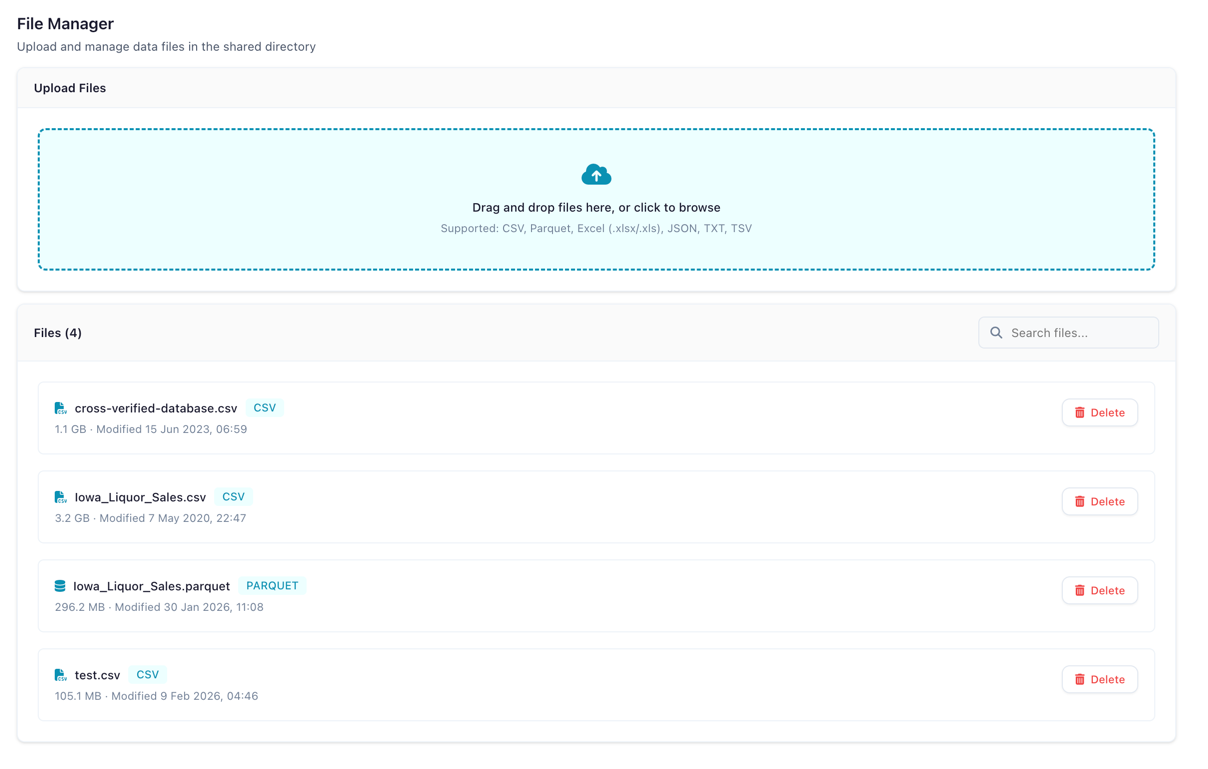
The File Manager showing uploaded files
Supported formats
CSV, Parquet, Excel (.xlsx and .xls), JSON, TSV, TXT
File size limit
Maximum 500 MB per file.
Usage
- Open Settings (the gear icon in the left sidebar) and choose Workspace → File Manager
- Click Upload to add a file
- Uploaded files appear in the file list and can be used in Read Data input nodes
- Click the delete icon to remove a file
Access
The File Manager is only available when FLOWFILE_MODE=docker is set.
Troubleshooting
Setup wizard keeps appearing. The master key is not configured. Add FLOWFILE_MASTER_KEY to your .env and restart.
Invalid master key format. The master key must be a valid Fernet key. Generate a new one with python -c "from cryptography.fernet import Fernet; print(Fernet.generate_key().decode())". Changing the key makes existing encrypted secrets unreadable.
Container fails to start. Check the logs: docker compose logs flowfile-core / docker compose logs flowfile-worker.