Kernel Architecture
The kernel system provides isolated Python code execution inside Docker containers. This page explains the internal architecture, component interactions, and key design decisions.
Looking for the user guide?
See Kernel Execution for the user-facing documentation on how to write code and use the flowfile_ctx API inside kernels.
Kernels are one half of a pair: the catalog is where their inputs and outputs live — Delta write-back, global artifacts, and the notebooks whose Python cells execute here. Catalog Architecture (especially its Notebooks section) covers that side of the contract.
Overview
The kernel system consists of two main components:
- Kernel Manager (
flowfile_core/flowfile_core/kernel/) — Orchestrates Docker container lifecycle and proxies execution requests from the Core API - Kernel Runtime (
kernel_runtime/) — A FastAPI application that runs inside each Docker container, executes user code, and manages artifacts
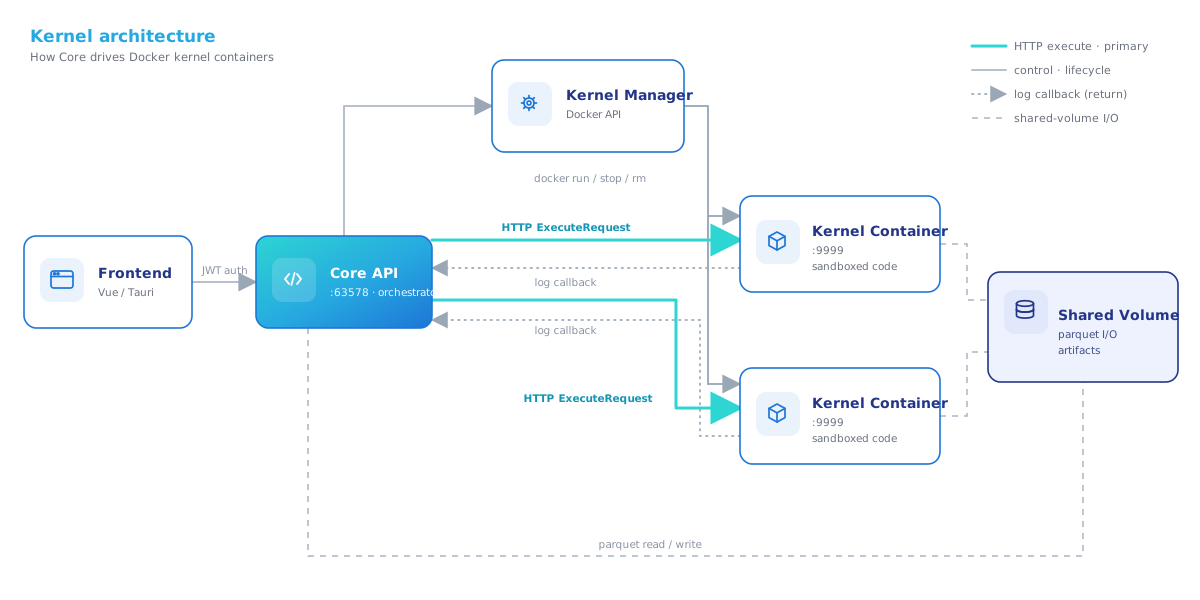
Kernel Manager
Location: flowfile_core/flowfile_core/kernel/manager.py
The KernelManager is a singleton that runs inside the Core service. It manages all kernel containers for all users.
Container Lifecycle
| Operation | What Happens |
|---|---|
| Create | Allocates a KernelInfo record, persists config to the database |
| Start | Verifies the pinned kernel image (flowfile-kernel-{base,ml,lite}:<tag>) exists, runs docker.containers.run(), polls /health until ready (120s timeout) |
| Execute | Serializes inputs to parquet, sends ExecuteRequest via HTTP, tracks kernel state |
| Stop | Stops and removes the Docker container |
| Delete | Stops if running, removes from in-memory registry and database |
| Shutdown | Called on Core shutdown — stops all running kernel containers |
Port Allocation
- Local mode: Allocates ports from the range 19000–19999. Each kernel gets a unique host port mapped to container port 9999.
- Docker-in-Docker mode: Skips port allocation entirely. Containers communicate via container names on the shared Docker network (
flowfile-network).
Docker-in-Docker Support
When the Core service itself runs inside Docker (e.g., via docker compose), the manager auto-detects:
- The Docker network to attach kernel containers to
- The named volume covering the shared storage path
- Whether to use container names or
localhost:portfor communication
This is configured automatically — no manual setup required beyond mounting the Docker socket.
Environment Variables Passed to Kernels
KERNEL_PACKAGES="{space-separated packages}"
FLOWFILE_CORE_URL="{core service URL}"
FLOWFILE_INTERNAL_TOKEN="{auth token}"
FLOWFILE_KERNEL_ID="{kernel_id}"
FLOWFILE_HOST_SHARED_DIR="{host path}"          # local mode only
FLOWFILE_KERNEL_SHARED_DIR="{container path}"
PERSISTENCE_ENABLED="true|false"
PERSISTENCE_PATH="{path to artifact storage}"
RECOVERY_MODE="lazy|eager|clear"
Versioning & compatibility
Flowfile does not define compatibility ranges between app and kernel versions, and performs no runtime version handshake. The contract is simply: each Flowfile release pins one exact kernel image tag.
Three independent version numbers
| Version | Where | Role |
|---|---|---|
| App / root | root pyproject.toml version |
The Flowfile release |
| Kernel image tag | flowfile_core/flowfile_core/kernel/images.py (_KERNEL_IMAGE_{BASE,ML,LITE}_DEFAULT — read the current value there) |
The image the app pulls / runs |
| Kernel runtime API | kernel_runtime/__init__.py (__version__) |
The kernel's HTTP API version, reported by /health |
Read each value from its source rather than assuming a number — the three are decoupled. They evolve independently: bumping the app does not require bumping the kernel image, and vice versa.
How the pin works
- Each Flowfile version hardcodes one exact kernel tag per flavour (e.g.
edwardvaneechoud/flowfile-kernel-ml:<version>) inmanager.py. That single tag — not a>=x,<yrange — is the version the app is built and tested against. - Core reads the running kernel's runtime version from
/healthintoKernelInfo.kernel_versionfor display only (the "Kernel runtime" line in the Kernel Manager). There is no min/max gate and nothing that rejects or warns about an "out-of-range" kernel. - The only hard coupling is polars:
kernel_runtimepins a polars (and thepolars-dsplugin) compatible with the app'spolars >=1.17.0,<1.44. These must be bumped together, but that compatibility is guaranteed at image-build time via the pinned tag — not by a runtime check.
So the practical contract is "use the pinned tag." An older kernel image is not blocked — it simply may lack fixes or features the app expects. That gap is surfaced as a non-blocking "Update available" hint in the Kernel Manager (per flavour) and the kernel details modal (per kernel), rather than a hard version gate.
Shipping a kernel change
Because the app only re-pulls a kernel tag it doesn't already have locally (images.get(tag) pulls only on a miss), a fix to kernel_runtime/ reaches users only when the image tag changes:
- Bump
versioninkernel_runtime/pyproject.toml(CI tags the published images from it). - Bump the three
_KERNEL_IMAGE_{BASE,ML,LITE}_DEFAULTtags inimages.pyto match. CI enforces this pairing:tools/check_kernel_version_sync.pyhard-fails the publish run when the pins and the kernel version drift. - Regenerate the image dependency manifest with
make kernel_manifest(make bump-version-kerneldoes this for you) and commit it.make check_kernel_manifestfails CI otherwise, and a stale manifest makes core report the wrong packages as present. - Merge — CI (
docker-publish.yml) checks Docker Hub and builds/pushesflowfile-kernel-{base,ml,lite}:<new>only if that tag is absent, so published version tags stay immutable and a missed publish self-heals on the next kernel-path push. (Aworkflow_dispatchwithforce_kernelrepublishes an existing tag.) On the next kernel start the app requests the new tag, misses locally, and pulls it.
For local development, build the image yourself (docker build -t flowfile-kernel-base:local kernel_runtime/); the :local tag is preferred by the resolver when the pinned registry tag isn't present, and is excluded from the version comparison (so it shows as a local build, not "up to date" or "update available").
Kernel Runtime
Location: kernel_runtime/kernel_runtime/main.py
The runtime is a FastAPI application (port 9999) that runs inside each Docker container. It executes user code and manages artifacts.
Execution Flow
When the Core sends an ExecuteRequest:
- Namespace creation — Creates or reuses a persistent Python namespace for the flow (Jupyter-style cell execution)
- Artifact cleanup — Clears artifacts from previous executions of the same node
- Context setup — Sets up the
flowfileAPI context (paths, artifact store, auth token) - Code execution — Runs user code in a worker thread via
asyncio.to_thread() - Output capture — Collects stdout, stderr, display outputs, and artifact metadata
- Response — Returns
ExecuteResultwith all outputs back to Core
View execution sequence diagram
sequenceDiagram
    participant Core as Core API
    participant Manager as Kernel Manager
    participant Runtime as Kernel Runtime
    participant Code as User Code

    Core->>Manager: execute(kernel_id, code, inputs)
    Manager->>Manager: Write inputs to parquet
    Manager->>Runtime: POST /execute (ExecuteRequest)
    Runtime->>Runtime: Get/create namespace for flow
    Runtime->>Runtime: Clear previous node artifacts
    Runtime->>Code: exec(code, namespace)
    Code->>Runtime: flowfile_ctx.read_input()
    Runtime-->>Code: pl.LazyFrame
    Code->>Code: Transform data
    Code->>Runtime: flowfile_ctx.publish_output(df)
    Code->>Runtime: flowfile_ctx.display(fig)
    Code->>Core: flowfile_ctx.log("message") [HTTP callback]
    Runtime-->>Manager: ExecuteResult
    Manager-->>Core: ExecuteResult
Thread-based Execution
User code runs in a dedicated thread so the FastAPI event loop stays responsive. The thread ID is tracked to enable cancellation:
- HTTP interrupt:
POST /interruptinjectsKeyboardInterruptviaPyThreadState_SetAsyncExc() - Signal fallback: Docker
kill -SIGUSR1for blocking C extensions
Cancellation is scoped to one execution, not to the kernel. Every ExecuteRequest carries an exec_token, and POST /interrupt takes an optional {"exec_token": ...} naming the cell to stop. Kernels are shared across flows, so this matters: without it, cancelling one flow would cancel whatever cell happened to be running. A token whose cell has already finished interrupts nothing — it never falls back to the newest cell. Core enforces the same rule on its side, refusing to send an interrupt unless that execution is the one currently holding the kernel's exec lock.
Persistent Namespaces
Each flow gets its own Python namespace dictionary (like a Jupyter kernel). Variables defined in one execution are available in subsequent executions of the same flow. Namespaces are stored in an LRU cache (default: 20 flows) to bound memory.
Artifact System
In-Memory Store
Location: kernel_runtime/kernel_runtime/artifact_store.py
The ArtifactStore is a thread-safe, flow-scoped, in-memory store with optional disk persistence:
- Flow isolation — Artifacts are keyed by
(flow_id, name), preventing cross-flow conflicts - Lazy loading — Disk-persisted artifacts can be loaded into memory on first access
- LRU eviction — Prevents unbounded memory growth for lazy-indexed artifacts
- Per-key locks — Lazy loading uses per-key locks to avoid blocking the global lock during I/O
Disk Persistence
Location: kernel_runtime/kernel_runtime/artifact_persistence.py
When persistence is enabled, artifacts are written to disk using cloudpickle:
{persistence_path}/{flow_id}/{artifact_name}/
  ├── data.artifact     # cloudpickle-serialized object
  └── meta.json         # JSON metadata + SHA-256 checksum
SHA-256 checksums validate data integrity on load. Path components are sanitized to prevent directory traversal.
Serialization
Location: kernel_runtime/kernel_runtime/serialization.py
Format is auto-detected based on object type:
| Object Type | Format | Rationale |
|---|---|---|
| Polars / Pandas DataFrame | Parquet | Efficient columnar storage |
| scikit-learn, NumPy, SciPy, XGBoost, LightGBM, CatBoost | Joblib | Optimized for ML objects |
| Everything else | Cloudpickle | Handles closures and dynamic classes |
A pre-serialization check (check_pickleable) validates that objects can be serialized before committing to API calls, providing clear error messages for common issues (lambdas, local classes, open file handles).
Flowfile Client API
Location: kernel_runtime/kernel_runtime/flowfile_client.py
This module provides the flowfile namespace available to user code. It uses contextvars for thread-safe execution context management.
Path Translation
In local Docker mode, the Core API returns paths using the host filesystem. The client translates these to the container's /shared mount:
Host:      /Users/you/.flowfile/shared/data/input.parquet
Container: /shared/data/input.parquet
In Docker-in-Docker mode, paths are identical (same named volume).
Global Artifact Flow
Publishing to the global catalog follows a three-step protocol:
- Prepare — Kernel calls
POST /artifacts/prepare-uploadto get a staging path (shared filesystem) or presigned URL (S3) - Serialize — Object is written directly to the staging location
- Finalize — Kernel calls
POST /artifacts/finalizewith checksum and size; Core moves the file to permanent storage
Core-side Components
API Routes
Location: flowfile_core/flowfile_core/kernel/routes.py
All endpoints require JWT authentication and enforce user ownership:
| Endpoint | Description |
|---|---|
GET /kernels/ |
List user's kernels |
POST /kernels/ |
Create a kernel |
POST /kernels/{id}/start |
Start kernel container |
POST /kernels/{id}/stop |
Stop kernel container |
DELETE /kernels/{id} |
Delete kernel |
POST /kernels/{id}/execute |
Execute code |
POST /kernels/{id}/execute_cell |
Execute in interactive mode |
GET /kernels/{id}/artifacts |
List artifacts |
POST /kernels/{id}/clear |
Clear all artifacts |
GET /kernels/{id}/display_outputs |
Get display outputs |
GET /kernels/{id}/memory |
Get memory usage |
GET /kernels/docker-status |
Check Docker availability |
There is no core-side interrupt route. Cancellation is a kernel-runtime concern: the runtime container exposes POST /interrupt on its own port (see Thread-based Execution), which Core reaches directly, not through a /kernels/{id}/interrupt proxy. It is always addressed to one execution's exec_token, so cancelling a flow never touches another flow's cell on the same kernel.
Database Persistence
Location: flowfile_core/flowfile_core/kernel/persistence.py
Kernel configurations (id, name, packages, CPU, memory, GPU) are persisted to the SQLAlchemy database. Runtime state (container ID, port, process state) is ephemeral and reconstructed at startup by reclaiming running containers.
Data Models
Location: flowfile_core/flowfile_core/kernel/models.py
Key models:
KernelConfig— Input for creating a kernelKernelInfo— Full kernel state including runtime infoKernelState— Enum:STOPPED,STARTING,IDLE,EXECUTING,ERRORExecuteRequest/ExecuteResult— Code execution request and responseDisplayOutput— Rendered visualization (mime_type + data)
Security Model
Authentication
| Boundary | Mechanism |
|---|---|
| Frontend → Core | JWT tokens (user login) |
| Core → Kernel | Internal token (X-Internal-Token header) |
| Kernel → Core (callbacks) | Same internal token |
The internal token is passed per-request in the ExecuteRequest and also set as an environment variable in the container for fallback.
Sandboxing
- Process isolation — Each kernel runs in its own Docker container
- Resource limits — Memory (
mem_limit) and CPU (nano_cpus) are enforced by Docker - Filesystem isolation — Only the shared volume is mounted; the host filesystem is not accessible
- User ownership — Each kernel is owned by the user who created it; other users cannot access it
Trust Boundaries
Artifact serialization uses pickle/cloudpickle. This is acceptable because:
- Artifacts are only written by user code running inside the kernel
- Users already have arbitrary code execution privileges
- No untrusted external data flows into the artifact store
Docker Setup
Building the Kernel Image
The resolver looks for flowfile-kernel-{base,ml,lite}:local when the pinned registry tag isn't present locally, so tag your local build to match the flavour you want to run:
# Via docker compose (builds the base flavour as flowfile-kernel-base:local)
docker compose --profile kernel build flowfile-kernel

# Or directly — tag the flavour explicitly
docker build -t flowfile-kernel-base:local -f kernel_runtime/Dockerfile kernel_runtime/
A bare docker build -t flowfile-kernel … produces a tag the app will not pick up.
The image is based on python:3.12-slim and includes:
- Data stack: Polars, PyArrow, NumPy
- ML stack: scikit-learn, Joblib
- Serialization: cloudpickle
- Server: FastAPI + Uvicorn
Docker Compose Integration
The docker-compose.yml includes a build-only service per kernel flavour (flowfile-kernel, flowfile-kernel-ml, flowfile-kernel-lite). The base flavour:
flowfile-kernel:
  build:
    context: kernel_runtime
    dockerfile: Dockerfile
  image: flowfile-kernel-base:local
  entrypoint: ["true"]
  restart: "no"
  profiles:
    - kernel
These services are not started by docker compose up — the kernel profile only builds the images (the entrypoint: ["true"] exits immediately). The Core service creates kernel containers dynamically via the Docker API, using the flowfile-kernel-{base,ml,lite}:local tags.
Docker Socket
The Core service requires access to the Docker socket (/var/run/docker.sock) to manage kernel containers. In production, consider using a Docker socket proxy (e.g., tecnativa/docker-socket-proxy) to restrict API access.
Network Configuration
The Docker network uses a fixed name (flowfile-network) so that dynamically created kernel containers can join it:
networks:
  flowfile-network:
    driver: bridge
    name: flowfile-network
Testing
Unit Tests
# Kernel runtime unit tests
pip install -e "kernel_runtime/[test]"
python -m pytest kernel_runtime/tests -v
Integration Tests (Docker Required)
# Build the base kernel image first (tag must match the resolver's flavour tag)
docker build -t flowfile-kernel-base:local -f kernel_runtime/Dockerfile kernel_runtime/

# Run kernel integration tests
poetry run pytest flowfile_core/tests -m kernel -v
The kernel pytest marker identifies tests that require Docker. These tests are skipped in environments without Docker and run in a separate CI job.
Related Documentation
- Kernel Execution — User guide for writing kernel code
- Architecture — Overall Flowfile architecture
- Docker Deployment — Docker compose reference